Your home internet isn't the problem. Bilibili decides which server you download from, and the one I get in Singapore chokes on anything unpopular.
Same site, two very different experiences. A trending video starts instantly and 4K plays without a hiccup. Open something with a few thousand views and even 720p sits there spinning.
The usual advice online: use a VPN, or switch your DNS (the service that turns domain names into IP addresses) to 8.8.8.8. Some people swear it works. Others say it does nothing.
TIP
TL;DR: Bilibili picks the server your video downloads from. The one you get overseas is fast for popular videos and painfully slow for unpopular ones. The fix is picking a different server yourself.
Here's where it actually gets stuck.
Where Bilibili videos actually come from
When you hit play, your browser first asks Bilibili: "where do I download this video?" Bilibili answers with a URL, and the player downloads the video from that URL piece by piece.
That URL points at a CDN node. Think of it as a warehouse.
The original files live in data centers in China (the origin). If everyone on Earth downloaded from there it would melt, so Bilibili keeps copies in warehouses around the world and you grab from whichever one is close.
But no warehouse stocks everything.
- Popular videos: lots of people have watched them, so the warehouse already has a copy and ships it from nearby. Fast.
- Unpopular videos: the warehouse is out of stock. It has to pull the file from the origin in China first. This is called an origin fetch.
Few people watch unpopular videos, so warehouses don't keep them around for long. Videos are also downloaded in chunks, and the chunk you're watching may never have been requested by anyone before. So unpopular videos need an origin fetch almost every time.
I live in Singapore. I asked Bilibili for the URLs of 20 videos, ranging from single-digit views to 58 million. All 20 came back with the same host: upos-hz-mirrorakam.akamaized.net, Akamai's overseas CDN. The backup URL was overseas too (Tencent Cloud's cosov), so falling back to it just lands you in another overseas warehouse.
I tested that Akamai hostname from Singapore with 10 videos, popular and obscure: 245 Mbps on the popular ones, 0.6 Mbps on the unpopular ones (4K needs somewhere in the low 20s). Same hostname, 400x apart. Wild.
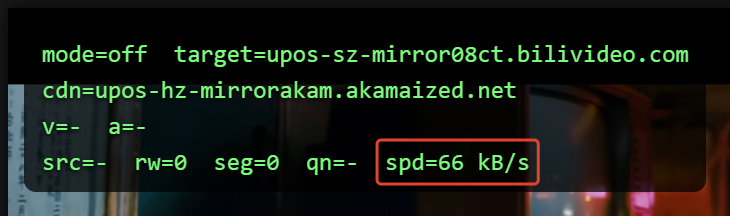
I wrote a browser extension (more on that later) with a debug overlay that shows which server Bilibili handed you. This one was taken in Singapore on a different video: Akamai, at 66 kB/s, roughly 0.5 Mbps. (Ignore the target on the first line for now.)
Your speed is set by the narrowest stretch
A video travels from the origin to your screen like a relay: origin → warehouse → your ISP → your home.
Your speed equals the narrowest stretch of that route. The bottleneck.
So when an unpopular video buffers, it doesn't matter that you have gigabit fiber or how wide the Akamai-to-you stretch is. The 245 Mbps on popular videos already proves that stretch is fine, so the 0.6 Mbps has to come from the origin fetch.
Why is the origin fetch so narrow? From the outside you can't tell. Maybe Bilibili gives Akamai very little bandwidth for it, maybe the route is bad. I can't measure which. It's 0.6 Mbps either way, and that can't even hold 720p.
Why are popular videos fast? No origin fetch, so that bottleneck simply isn't there.
300+ nodes, and overseas you get Akamai
Bilibili has 300+ nodes, and Akamai is just one of them. My extension lists 300 that work for regular videos (not live streams). Most are data centers Bilibili runs in China's provinces (URLs look like cn-sdjn-fx-01-01.bilivideo.com, where sdjn is Jinan, Shandong). The rest belong to Huawei Cloud, Alibaba Cloud and Tencent Cloud.
What my extension does is swap Akamai for one of these nodes inside China.
If you know a bit about networking, you're probably thinking: a node inside China has to send every single byte across the border to reach you. By the logic above, shouldn't that be even slower?
In practice, no. In the same 10-video test, most of Bilibili's provincial data centers averaged 45 to 55 Mbps, with unpopular videos about as fast as popular ones (not counting the nodes that only serve popular videos, more on those later).
The difference is which stretch crosses the border:
- Akamai: the stretch that crosses the border appears to be the origin fetch. 0.6 Mbps on unpopular videos.
- A node inside China: it already sits in China, so a missing file gets fetched domestically. The stretch that crosses the border is node-to-you, measured at 45 to 55 Mbps from Singapore.
Both cross the border, but which carrier, which grade of link, and how much bandwidth Bilibili pays for all differ. Measured the same way, on a single connection, the domestic node's bottleneck is 75 to 90 times faster than Akamai's origin fetch.
NOTE
A lot of people blame the Great Firewall. Both routes go through it, and the domestic one still hits 45 to 55 Mbps, so the firewall alone doesn't explain it. The grade of link and the bandwidth behind it are the more likely difference.
You do give something up: popular videos lose Akamai's 245 Mbps bursts, and with China being farther away, playback might take a fraction of a second longer to start. For watching videos, no buffering matters more.
So why doesn't Bilibili give overseas viewers domestic nodes? No idea. Cost, I'd guess.
Why switching DNS or using a VPN is hit or miss
Once you know the URL comes from Bilibili, it's easy to see why those tricks only sometimes work.
Switching DNS (8.8.8.8): DNS only turns the hostname Bilibili gave you into an IP address. The hostname is still Akamai. At best you land on a different Akamai machine, which might be a bit faster or a bit slower for popular videos. Unpopular ones still need the origin fetch. Pretty much no help.
Using a VPN: Bilibili now sees the VPN server's IP and picks a URL based on that. If the VPN exits overseas, you'll most likely still get an overseas warehouse like Akamai. Only a VPN that exits in China has a real shot at a domestic node. On top of that, all your traffic detours through the VPN server, and the VPN's own bandwidth can become the new bottleneck.
A VPN makes Bilibili reshuffle the deck. Switching DNS doesn't even do that.
To actually fix it, you have to pick the server yourself: once Bilibili hands you a URL, swap the node in it for one you chose.
Picking a node yourself isn't that simple either
Pick the fastest of 300 nodes. Sounds like you just run a speed test.
What makes it annoying is that the same node can be amazing for one person and useless for the next. At least four things decide how it goes:
- Your ISP: every ISP buys a different amount of international bandwidth and connects better to some Chinese carriers than others.
- Geography: which province the node is in, and how close it is to an international gateway.
- Popular vs unpopular: a batch of nodes only serves popular videos and returns 403 for everything else (I found 40-something from Singapore). Test with popular videos only and you'll pick a node that can't open most unpopular videos.
- Time of day: evening peak and 3 a.m. can give completely different results.
Here's real data from Taiwan (speed test reports that users across Taiwan ran for me, more on that below).
The China Mobile data center in Nanchang, Jiangxi (cn-jxnc-cm-01-19) is a dream for Chunghwa Telecom HiNet, Taiwan's biggest ISP: all 21 HiNet lines in the reports could play 4K. On TBC and Extra-Lan (two smaller Taiwanese ISPs), the same node mostly times out.
Flip it around. The data centers in Jinan, Shandong and Wuhan, Hubei (cn-sdjn-fx-01-01, cn-hbwh-fx-01-01) play 4K on every kbro, TBC and Extra-Lan line. On HiNet, about half the lines make it, a third sit around 9 Mbps (fine for 1080p, not 4K), and the rest came from an early version of the speed test tool that skipped this node.
So there's no such thing as "the fastest node in Taiwan". There's only the fastest node for your line.
What I did: start with the node least likely to break
The browser extension I built is called BiBoost - Speedup for bilibili. Once Bilibili hands out the video URL, the extension swaps the node in it for the one you chose and keeps it there, so it doesn't drift back to Akamai (it only falls back to Bilibili's own backup node, temporarily, if playback fails).
The default is where it gets hard. Most people never open the settings, so the default node basically is the experience.
So I built a Windows speed test tool and asked users on every ISP in Taiwan to run it. Each run tests 300 nodes against a dozen or so videos with different view counts and resolutions, instead of crowning whichever node was fastest on one video.
From the reports, every node gets two numbers, both weighted by each ISP's market share: the share of users who can play 4K on it, and the share who can't connect at all. Missing 4K usually still leaves you with 1080p. Not connecting means a black screen. So keeping the can't-connect share low comes first.
In Taiwan, the Jiangxi node actually wins on 4K (58% vs 55%), but 14% of users can't connect to it, versus 9%. Trading 3 points of 4K for 5 points fewer black screens is worth it. So the default is cn-sdjn-fx-01-01 in Jinan.
The other 10 nodes are picked round-robin, in market share order, from each ISP's own top tier, so every major ISP gets a pick.
It works as soon as you install it. No setup. A user in Taiwan who opens the popup sees the country already set to Taiwan from their IP, with the default node selected:
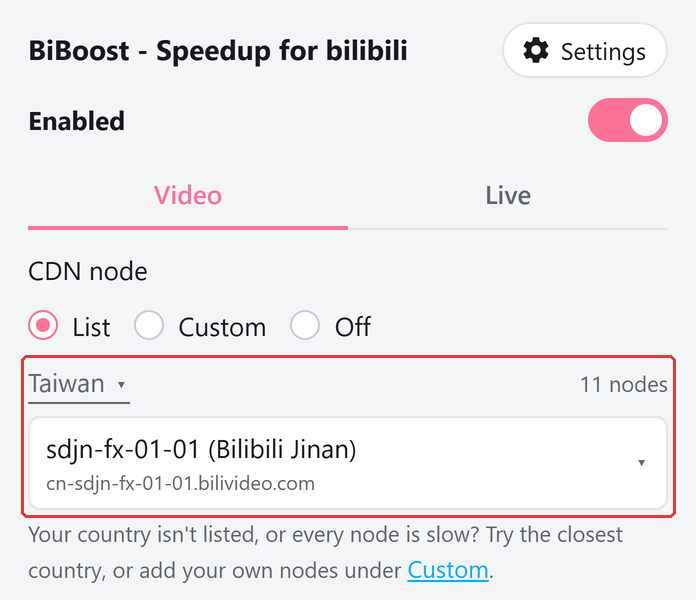
On the first video after you install, the extension tests the 11 Taiwan nodes in the background once and switches to whichever is fastest on your connection. If you're in the 9% who can't connect to the default, the extension first falls back to Bilibili's own backup node when playback fails (another overseas warehouse, so unpopular videos may still be slow), then switches once the test is done. Those 11 were already screened against popular and unpopular videos, so picking with a single video here won't land you on a node that can't open unpopular ones.
TIP
That test only runs once. If evenings feel slower, hit "Test node speeds" in the popup to retest and pick one yourself, or turn on "Auto-switch videos to the fastest node" in Settings (it tests on every video, but the screen goes black for a moment each time it switches). Still not happy? Use the custom node list and speed test tool to build a list tailored to your own network.
The debug overlay after the swap (also taken in Singapore; 08ct is a Huawei Cloud node from the Singapore list. Not the same video as the first screenshot, so treat the numbers as a ballpark):
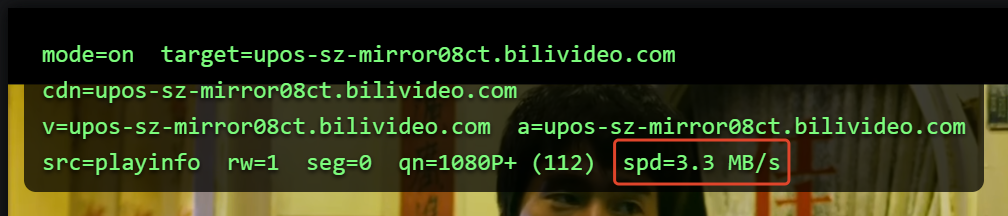
66 kB/s to 3.3 MB/s (about 26 Mbps).
Coverage in Taiwan so far
As of October 17, 2026, users in Taiwan have sent in 70 speed test reports from 14 ISPs, everywhere from Taipei, Taoyuan and Taichung to Kaohsiung and Hualien.
All the major fixed broadband ISPs are covered: Chunghwa Telecom, CNS (bb Broadband), kbro, TBC, Taiwan Mobile's broadband, Far EasTone (including the former Asia Pacific Telecom) and DaDa Broadband. Their customers add up to about 97% of Taiwan's fixed broadband market.
Going through the 70 reports one by one, 96% of them have at least one node in the Taiwan list that can play 4K.
The gap is CNS. No single node gets more than about 30% of CNS lines to 4K. Across the whole list, about 70% of CNS lines find a node that can. The rest mostly top out at 1080p.
IMPORTANT
If you're on CNS, please consider running the speed test. More samples, better picks.
The Chrome version has about 9,100 weekly users right now, 76% of them in Taiwan, which is why Taiwan's list is the most carefully tested.
Get it
- Chrome: BiBoost - Speedup for bilibili
- Source code, plus the Firefox and Edge versions: GitHub
Free, forever. If it helped, a 5-star rating or a GitHub star would make my day.

コメント(0)
まだコメントはありません。最初のコメントを書いてみませんか?