[Tech Notes] Splitting a Chrome Extension into MAIN-World and ISOLATED-World Scripts to Hook a Page
You patch
window.fetchin a content script and Bilibili's player ignores you completely. The window you patched isn't the one the page uses.
My Bilibili extension (here's the problem it solves) really does one thing: when Bilibili's player goes to fetch a video, swap the CDN node (the server the video files come from) in the URL for the one you picked.
To swap URLs you have to mess with Bilibili's own fetch, XMLHttpRequest and window.__playinfo__. Wrapping an existing function so you can tweak its arguments on the way through is called a hook.
The part of an extension that touches web pages is the content script: the browser runs it automatically on pages whose URL matches. Most people writing their first extension try this:
// content.js
const _fetch = window.fetch;
window.fetch = function (input, init) {
  console.log("gotcha", input);
  return _fetch.apply(this, arguments);
};
Install it, open Bilibili, and the Console stays silent. Not a single line. (First instinct: Bilibili must be overwriting fetch.)
The problem isn't fetch. It's window.
A content script's window is not the page's window
By default, Chrome runs content scripts in something called the ISOLATED world. Think of it as sharing a house with the page but sleeping in separate rooms.
It shares the DOM with the page (document.querySelector returns the same element) and the same-origin localStorage. But the JavaScript globals are separate copies: the page has its window.fetch, the content script has its own. You patched yours. Bilibili's code still calls the original.
Chrome does this on purpose. Neither side can see the other's JS objects, so the page can't poke at the extension's variables, and the extension isn't affected by whatever prototypes the page decides to mangle.
So how do you reach the page's copy? In the extension's config file, manifest.json, you can set "world": "MAIN" on a content script. It then runs inside the page's own JS environment, and its window is Bilibili's window. That field arrived in Chrome 111 (Chrome docs) and Firefox 128 (MDN). Older browsers simply won't recognize it.
The catch: there are no extension APIs in the MAIN world. No chrome.storage, no chrome.i18n. Chrome may still show a chrome.runtime, but that's the stripped-down version regular web pages get for talking to extensions, not the extension's own. As far as the browser is concerned, you're part of the page now.
What each world can see
| MAIN world | ISOLATED world | |
|---|---|---|
Page's window.fetch, XMLHttpRequest | Yes, and the page uses your patch | Sees its own copy, patching it does nothing |
Page globals (window.__playinfo__, window.player) | Yes | No |
DOM, same-origin localStorage | Yes | Yes |
window.postMessage and message events | Can send and receive | Can send and receive |
chrome.storage, chrome.i18n, the extension's chrome.runtime | No | Yes |
MAIN can change the page but can't read the settings you saved in the popup (the little window that opens when you click the extension's icon). ISOLATED can read the settings but can't change the page.
What about the old trick? The classic approach is to have an ISOLATED content script inject a <script> tag so the code runs in the page. But a <script src> has to load first, so there's no guarantee it beats Bilibili's own scripts. Inline code can get blocked by the page's CSP (the security policy that limits what scripts a page may run). And the injected code still can't reach chrome.*, so it needs someone to pass messages anyway.
If you're going to have two pieces of code no matter what, you might as well declare both in the manifest.
Two scripts: main-hook.js and bridge.js
Here's the content script section of the extension's src/manifest.json (v2.6.0):
"content_scripts": [
  {
    "matches": ["*://*.bilibili.com/*"],
    "js": ["main-hook.js"],
    "run_at": "document_start",
    "world": "MAIN",
    "all_frames": true
  },
  {
    "matches": ["*://*.bilibili.com/*"],
    "js": ["bridge.js"],
    "run_at": "document_start",
    "world": "ISOLATED",
    "all_frames": true
  }
]
The split:
main-hook.js(MAIN): wraps Bilibili'sfetch/XHR, interceptswindow.__playinfo__, and rewrites video URLs to the chosen node. How the hooks work is out of scope here; the hook details are in a separate post.bridge.js(ISOLATED): reads settings fromchrome.storage.localand UI strings fromchrome.i18nand hands them to main-hook. It forwards main-hook's logs to background, and holds speed test progress until the popup asks for it.
The yellow layer is the part to look at. main-hook and bridge can't call each other's functions. The only things they both touch are what they share: the DOM, same-origin localStorage, and message events on window. And Bilibili's own scripts sit on that same layer, which comes back when we get to security.
The diagram only shows the settings path. When you hit speed test in the popup, it sends the command straight to this tab's bridge with chrome.tabs.sendMessage, skipping chrome.storage. That comes up again under all_frames.
How they talk: localStorage for startup, postMessage for everything after
Here's what bridge does on startup (src/bridge.js, trimmed):
var CFG_KEY = "__CDN_SWITCHER_CFG__";

function pushConfig(cfg) {
  // 1) write a copy to same-origin localStorage, for main-hook to read synchronously next load
  window.localStorage.setItem(CFG_KEY, JSON.stringify(cfg));
  // 2) push it to main-hook on the page that's open right now
  window.postMessage({ __cdnSwitcher: 1, dir: "config", payload: cfg }, "*");
}

function loadAndPush() {
  chrome.storage.local.get(DEFAULTS, function (items) { pushConfig(/* merged with defaults */ items); });
}

loadAndPush();
chrome.storage.onChanged.addListener(function (changes, area) {
  if (area === "local") loadAndPush(); // popup changes a setting, push again right away
});
Same settings, two routes. Why?
Because main-hook has to decide "do I install the hooks, and which node do I use" before Bilibili's scripts run, and that decision has to be synchronous. It can't reach chrome.storage. Even if it could, chrome.storage.local.get is async. By the time the callback fires, Bilibili may already have fetched the video URLs. (Plain version: synchronous means the value is in your hands when the line finishes. Async means you leave a "call me when it's ready" callback and the result shows up later, while Bilibili's code keeps running.)
localStorage.getItem is synchronous. So main-hook reads it first thing:
var cfg = readCfg();
function readCfg() {
  var c = {};
  for (var k in DEFAULTS) c[k] = DEFAULTS[k];
  try {
    var raw = window.localStorage.getItem(CFG_KEY);
    if (raw) { var p = JSON.parse(raw); for (var k2 in DEFAULTS) if (p[k2] !== undefined) c[k2] = p[k2]; }
  } catch (e) {}
  return c;
}
What it reads is whatever bridge wrote last time. On a fresh install, localStorage is empty and it falls back to the hard-coded DEFAULTS.
What if localStorage and chrome.storage disagree? While any Bilibili tab is open, onChanged makes bridge rewrite localStorage immediately, so they don't. They drift when you change a setting with no Bilibili tab open: the popup writes chrome.storage, but no bridge is running to update localStorage. Next time you open Bilibili, main-hook reads the stale value first. (Clearing bilibili.com's site data does the same thing, except it falls back to DEFAULTS.)
That's where postMessage catches up. Once bridge reads chrome.storage, it sends dir: "config", and main-hook diffs the old and new settings. A node change just calls player.reload() inside the player. Only changes that need hooks installed or removed (turning the feature on or off) trigger a full page reload.
One more thing about "same-origin" localStorage: www.bilibili.com and a subdomain like player.bilibili.com each get their own copy. So for main-hook inside an iframe to read the settings, that iframe needs its own bridge writing to its copy. Both scripts using all_frames (more on that below) is what pairs them up.
UI strings work the same way. main-hook shows toasts ("switched to backup node" and so on), but there's no chrome.i18n in MAIN. So bridge looks up the strings, writes them to localStorage under __CDN_SWITCHER_MSGS__, and postMessages them too. main-hook's readMsgs() is almost a copy of readCfg(), with built-in Traditional Chinese strings as a fallback until bridge catches up.
The reverse direction is postMessage as well. Every message carries __cdnSwitcher: 1 plus a dir that says what it is:
- main-hook → bridge:
journal(event log),sample(playback samples),debug(debug snapshot),speedtest-progress/speedtest-done,autotest-done(the node the auto speed test picked) - bridge → main-hook:
config,messages, plusspeedtest-runandspeedtest-stoprelayed from the popup
bridge forwards logs and debug snapshots to background (the extension's background script, a service worker in Chrome) with chrome.runtime.sendMessage, which keeps them in storage.session (wiped when the browser closes). Speed test progress stays in bridge until the popup asks for it. main-hook never touches chrome.storage and doesn't keep its own logs. It just shouts what happened.
chrome.storage is the source of truth. localStorage is a copy MAIN can read synchronously at startup. postMessage carries everything that changes after that.
Why it has to be document_start
run_at decides when a content script runs: document_start (the HTML has only just started parsing), document_end, or document_idle (the default, roughly when the page has finished loading). Both scripts here use document_start: the hooks have to be in place before Bilibili's own scripts run.
Bilibili video pages embed window.__playinfo__ (the stream URLs for the first part) right in the HTML, and the player calls playurl (the API that gives the player its video URLs) early. Install the hooks at document_idle and the URLs are already fetched. Too late.
Testing this is easy: load the extension in headless Chromium (Chromium with no window, used for automated tests) and point it at a fake www.bilibili.com page. The very first inline script in the page's <head> reads String(window.fetch) and already gets main-hook's wrapper (function (input, init) { var url = ""; ...). At least in this test, the MAIN world document_start script ran before the page's first line of code.
One test isn't a guarantee, though. The real Bilibili page is messier and I can't promise it's in time every time. So after installing its hooks, main-hook checks the Performance API (the browser's timeline of every network request) for any playurl request that went out before the hooks existed, and records it as playurlBeforeHook. When someone reports a bug, you can tell at a glance whether it was a race condition (whoever finishes first wins, and this time the hook lost).
bridge is document_start too, to get its message listener attached early. postMessage delivers asynchronously, so main-hook's first log entries arrive a bit later, and bridge only needs its listener in place during the same phase to catch them. (Writing localStorage can't be sped up this way. It happens inside the chrome.storage.local.get callback, which is async anyway.)
all_frames: true is there because the player isn't always in the top-level page. Embedded players and previews live in iframes, and those need their node swapped too. Every frame gets its own main-hook + bridge pair. Two side effects:
- When the popup sends a message, every frame's bridge receives it, so bridge only answers the popup when
window.top === window. - main-hook only records event logs and playback samples from the top frame. The code comment's reason: players inside iframes (embeds, previews) aren't logged so they don't drown out the main page's records. Node swapping still happens in iframes. Bug reports just won't include logs from an iframe player, and that's a deliberate trade-off.
NOTE
The popup could target the top frame only with chrome.tabs.sendMessage(tabId, msg, { frameId: 0 }). But as a comment in bridge.js says, iPad Safari can't take frameId: 0, so the popup falls back to sending without a frame and bridge checks isTopFrame itself.
Security: MAIN and postMessage are public spaces
Anything you put in the MAIN world or send over postMessage is visible to the Bilibili page. In a headless Chromium test, the page's own scripts could see:
- What's hung on
windowin MAIN:window.__CDN_SWITCHER_INSTALLED__(a guard against double install) andwindow.__cdnSwitcherSimulateStall(a stall simulator for testing; it ships in the release build too, just with no UI to reach it). Everything else in main-hook lives inside an IIFE (a function that runs as soon as it's declared, so its variables never land on window). __CDN_SWITCHER_CFG__and__CDN_SWITCHER_MSGS__in localStorage.- Every postMessage. A
messagelistener on the page receivedjournal,config,messagesanddebug, in that order.
So only put things there that are fine to be seen. Settings, UI strings, host names: fine. Tokens, personal data, full signed segment URLs: no. main-hook's log code says it outright: segment URLs are logged as host and file name only, never the signature parameters.
And if the page can see it, the page can send it too: anyone can postMessage. Any script in the same window (Bilibili's, a third-party script it loads, another extension's content script in either world) can send a message that looks exactly like main-hook's.
bridge's listener starts like this:
window.addEventListener("message", function (ev) {
  if (ev.source !== window) return;            // check 1
  var d = ev.data;
  if (!d || d.__cdnSwitcher !== 1) return;     // check 2
  // ...dispatch on d.dir
});
- Check 1,
ev.source !== window: drops messages from other iframes and windows. A script in the same window hassource === window, so it passes. - Check 2,
__cdnSwitcher !== 1: picks our messages out of everything posted on the window. That's sorting, not authentication. Anyone can add that field.
Those two are the only checks every message goes through. After dispatching on dir, each message type decides for itself whether to check its content. For example, before autotest-done writes a node back, it confirms that the node at test start still matches the current setting.
The only thing that stops a forged message from the same page is check 3 in the diagram: is the content sane? And every message type has to write its own. The ones that matter most are those that end up in chrome.storage, because those values stick around and affect every Bilibili tab after that.
One path in the extension already does this, though it doesn't go through postMessage. The extension ships with a separate speed test program (not the popup's speed test, but a Windows app you download separately). When it finishes, it has no direct line to the extension, so it opens https://www.bilibili.com/#cdnsw-import=1.<host>,<host>… in the browser, bridge reads the hash, and background imports the nodes into the custom list. Any website can build that URL, so the comment in background.js spells it out: it only accepts nodes listed in cdn-list.json (the extension's built-in node list, i.e. the allowlist in the diagram), and nobody can use it to point your videos at their own domain.
When you write your own, treat every postMessage that ends up in chrome.storage the same way: accept values from an allowlist and drop everything else.
What about Firefox and Safari?
The content_scripts block in src/manifest.firefox.json is identical to Chrome's: world: "MAIN"/"ISOLATED", document_start, all_frames. The two manifests differ elsewhere. Firefox uses "scripts": ["background.js"] instead of service_worker, and adds browser_specific_settings.gecko (the extension id, minimum supported version and so on). At build time, scripts/build.mjs just renames the right file to manifest.json inside the zip.
The Safari Xcode project references the repo's src/ by relative path (per the comment in scripts/build-safari.mjs), so it reads the same manifest as Chrome.
In other words, Chrome (and Edge, same engine), Firefox and Safari all declare world: "MAIN" in the manifest, and the repo has no fallback for older browsers that lack it (like the <script> tag trick from earlier). Cross-browser differences are handled elsewhere: the iPad Safari frameId issue above, and background.js falling back from storage.session to storage.local on older Safari.
See the two worlds for yourself
Install the extension first (search "BiBoost - Overseas Video Speedup" in the Chrome Web Store, or load src/ from GitHub as an unpacked extension), open any Bilibili video, and open the DevTools Console.
Above the Console input there's a context dropdown, set to top by default. That's the page itself, the MAIN world. With the extension installed, the dropdown gets an extra entry with the extension's name. That's its ISOLATED world.
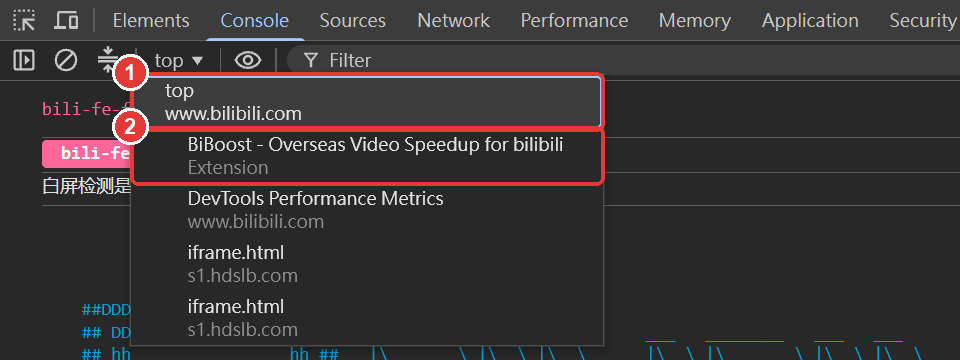
(The iframe.html entries are iframes inside the Bilibili page, each with its own top. DevTools Performance Metrics belongs to DevTools itself, ignore it.)
Run these in each context:
typeof chrome.storage                    // top: "undefined"   extension: "object"
window.__CDN_SWITCHER_INSTALLED__        // top: true          extension: undefined
localStorage.getItem("__CDN_SWITCHER_CFG__") // same value in both
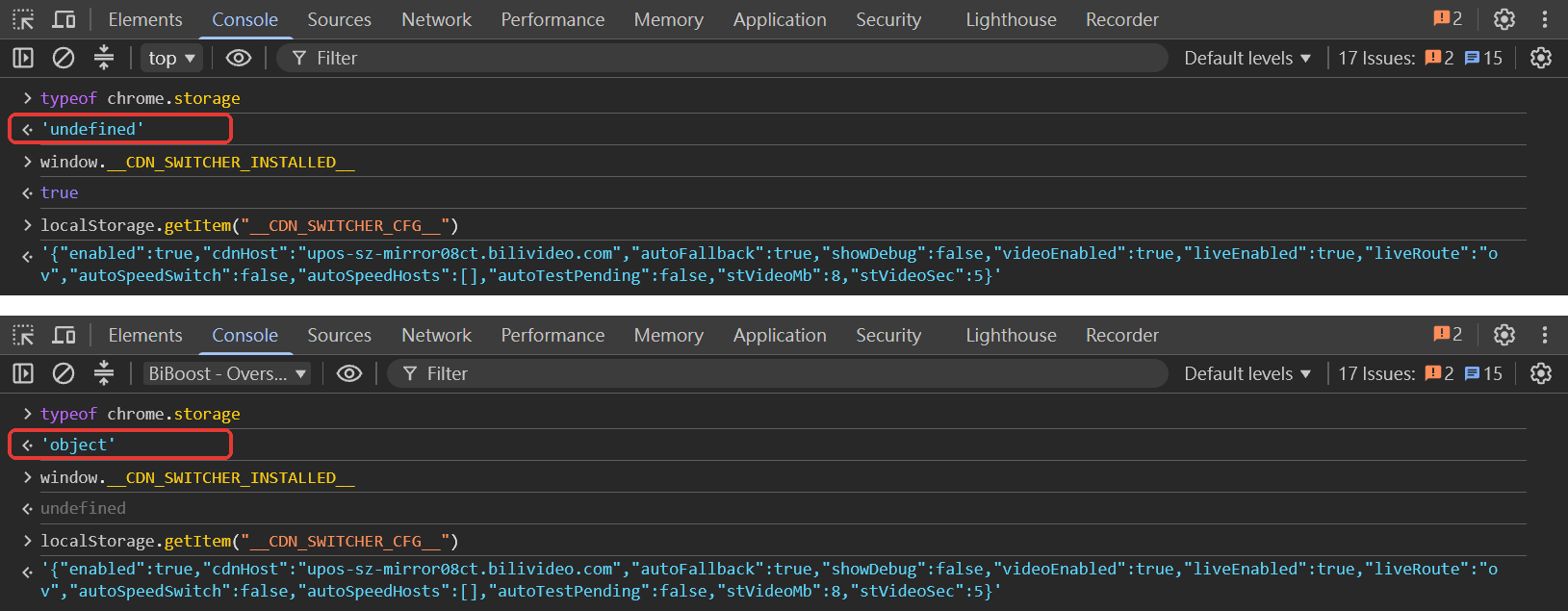
The first two lines flip. The third doesn't. Separate JS objects, shared localStorage, right there in the Console.
Next time your extension needs to change how a page's JavaScript behaves, ask one question first: am I changing the page, or am I using chrome.*? If it's both, put one script in MAIN, one in ISOLATED, and pass messages through localStorage and postMessage.