[Tech Notes] Shipping a Bilibili Extension from One Codebase to Chrome, Edge, Firefox and Safari
4 stores × 5 languages, 11 releases in a month. Doing that by hand means something gets missed. So the things that must not be missed (version numbers, packaging, draft uploads) belong to scripts, and even the dashboard copy gets filled into drafts by browser automation. The one thing that must not go wrong, pressing Publish, stays with me.
My Bilibili extension (BiBoost - Overseas Video Speedup for bilibili) is live on Chrome, Edge and Firefox. The Safari build and upload are wired into the same pipeline, but at the time of writing it isn't on the App Store yet (the repo README still says coming soon). The UI ships in 5 languages: Traditional Chinese, Simplified Chinese, English, Japanese and Korean.
src/changelog.json lists 11 versions, from 1.5.0 on Sep 19 to 2.6.0 on Oct 18. One month.
Building it, publishing it, answering forum comments: that's all me.
Here's what one release looks like if you do it by hand:
- Bump the version in three places: the Chrome manifest, the Firefox manifest, the Xcode project
- Write release notes, once per language (5)
- Package three zips: Chrome, Edge, Firefox
- Upload to three dashboards, then paste listing copy (3 stores × 5 languages = 15 descriptions)
- Store screenshots, one set per language
- Create a GitHub Release with the offline install files
- For Safari: archive, sign, upload to App Store Connect
Once or twice, fine. Eleven times a month? Something slips. Two of three version numbers bumped. Japanese release notes forgotten. Release notes for the next version leaking out inside the zip. Screenshots still showing the UI from two versions ago.... I don't want any of that to depend on my memory.
In order: how one codebase turns into four builds, why packaging has to be reproducible, how release notes are managed, how Safari fits in, and finally how one /release ties it all together.
One src/, four builds
Short version: there aren't four codebases. There's one src/ folder.
The extension has no compile step. src/ is plain JS, HTML and locale files, and pointing Chrome's "Load unpacked" at it just works. "Packaging" means zipping src/.
The only difference is the manifest:
- Chrome and Edge share
src/manifest.json. Edge is Chromium-based, and every Manifest V3 API this extension uses behaves the same there, so no separate file. - Firefox uses
src/manifest.firefox.json.
And this is the entire diff between the two:
+    "browser_specific_settings": {
+        "gecko": {
+            "id": "bilibili-cdn-switcher@…",
+            "strict_min_version": "140.0",
+            "data_collection_permissions": { ... }
+        },
+        "gecko_android": { "strict_min_version": "142.0" }
+    },
     "background": {
-        "service_worker": "background.js"
+        "scripts": ["background.js"]
     }
Firefox wants a fixed add-on ID and uses scripts instead of service_worker for the background script. Everything else is identical.
scripts/build.mjs reads the right manifest, renames it to manifest.json at the zip root, and does two more things:
- Swaps in the production icons.
src/icons/holds the dev icons (with an extra red dot so I can tell them apart from the installed store version). The zip getsassets/icons-prod/instead. - Empties the
unreleasedlist inchangelog.json. More on that later.
Safari takes a different route. Safari extensions can't be installed from a zip. They live inside an app (.app on macOS, .ipa on iOS), and getting onto the App Store means going through Xcode: build, sign, submit.
The safari/ folder is an Xcode project generated by xcrun safari-web-extension-converter. Its extension resources point at the repo's src/ through relative paths (../../../src/). So editing src/ needs no file syncing. Xcode picks up the latest files on every build.
The packaging script started life in PowerShell. No pwsh on a Mac, no build. It's now plain Node (jszip for zipping, sharp for icons) and runs on Windows, Mac and Linux.
Reproducible builds: same content, same zip
The packaged zips in dist/ are committed to the repo (right now it holds 2.5.0 and 2.6.0).
Here's the catch. By default JSZip stamps every file in the zip with the time of packaging. Change nothing in src/, package again, and the timestamps differ, so the bytes differ.
On release day that doesn't matter: the version number changes, so the zip should change. The pain is between releases. Tweak the build script, regenerate icons, or just run npm run build out of habit: src/ didn't move, yet git says every zip changed. That diff carries zero information, and I (or the agent) still have to decide whether to commit it or re-upload.
Flip it around: if the same content always gives the same bytes, a diff on the zip means the content really changed. It also makes a future CI check possible: rebuild in CI, compare hashes, and a mismatch means someone forgot to repackage.
So build.mjs pins the timestamp:
// zip 內每個 entry 的時間戳都固定成這個,內容沒變的話每次包出來的 zip bytes 才會完全一樣
// (reproducible build),不然每個 entry 會帶「打包當下」的時間,光時間不同就會讓 bytes 每次都不同。
// (Every entry gets this fixed timestamp, so unchanged content produces byte-identical zips.)
const FIXED_DATE = new Date(Date.UTC(1980, 0, 1));
Pinning file timestamps wasn't enough: for a path like _locales/en/messages.json, JSZip quietly adds _locales/ and _locales/en/ folder entries, stamped with the current time. createFolders: false turns that off.
build.mjs also hard-codes platform: "UNIX", with a comment claiming the attribute fields otherwise vary by OS. While writing this I checked, and they don't: JSZip never looks at the OS it's running on, and without the option it always writes DOS. With platform removed, I faked process.platform as win32, darwin and linux and packaged once each. Three identical hashes (just different from the UNIX one). So that line is insurance, not a requirement. What actually makes two machines disagree is line endings, coming up below.
zip.file(relName, fs.readFileSync(entries.get(relName)), { date: FIXED_DATE, createFolders: false });
// ...
const buf = await zip.generateAsync({
  type: "nodebuffer",
  platform: "UNIX",
  compression: "DEFLATE",
  compressionOptions: { level: 9 }
});
Let's actually run it. Copy the repo somewhere else, package twice in a row (5 seconds apart), compare sha256:
$ node scripts/build.mjs --out=../run1 > /dev/null
$ node scripts/build.mjs --out=../run2 > /dev/null
$ sha256sum run1/*.zip run2/*.zip
e08eac5b337306c7ccd77b1a0b70fa3bd5b19e823e8c7cebdd15630355c2e580  run1/bilibili-cdn-switcher-chrome-2.6.0.zip
e08eac5b337306c7ccd77b1a0b70fa3bd5b19e823e8c7cebdd15630355c2e580  run1/bilibili-cdn-switcher-edge-2.6.0.zip
fc98f77b5a3f1044cf3ea8c0a02fa1c5c20c8691d7788426640153d4ea492c6d  run1/bilibili-cdn-switcher-firefox-2.6.0.zip
e08eac5b337306c7ccd77b1a0b70fa3bd5b19e823e8c7cebdd15630355c2e580  run2/bilibili-cdn-switcher-chrome-2.6.0.zip
e08eac5b337306c7ccd77b1a0b70fa3bd5b19e823e8c7cebdd15630355c2e580  run2/bilibili-cdn-switcher-edge-2.6.0.zip
fc98f77b5a3f1044cf3ea8c0a02fa1c5c20c8691d7788426640153d4ea492c6d  run2/bilibili-cdn-switcher-firefox-2.6.0.zip
Identical. Bonus: the Chrome and Edge zips are literally the same file (same manifest, same src).
Control group: remove only date: FIXED_DATE (keep createFolders: false) and package twice (3 seconds apart):
$ sha256sum dateonly-*/*.zip
fc08a000ae3a6fd9c730f2d2808c000fac2c881a997bc37982cf319c174a5b12  dateonly-1/bilibili-cdn-switcher-chrome-2.6.0.zip
fc08a000ae3a6fd9c730f2d2808c000fac2c881a997bc37982cf319c174a5b12  dateonly-1/bilibili-cdn-switcher-edge-2.6.0.zip
a87a54d9e17a28d9b4d70ba6f559468dcca630f5268929deeac63304b05fb0b4  dateonly-1/bilibili-cdn-switcher-firefox-2.6.0.zip
122d95d4ccc2391606a01f94ae169fcf971b62622ce61eb3e6780ea0c276bcc9  dateonly-2/bilibili-cdn-switcher-chrome-2.6.0.zip
47a95e054b1d31febe14934da97c16aa72d6c63756e1efd7b608bc1d3142c6bf  dateonly-2/bilibili-cdn-switcher-edge-2.6.0.zip
4ebd292f0a8e213555f055d80748cbae08ec885a2d182863497c483bc7c8c58c  dateonly-2/bilibili-cdn-switcher-firefox-2.6.0.zip
Same content, every hash different. Funnier still: in run 2, Chrome and Edge don't even match each other. Within a single packaging run, the two zips landed on different timestamp ticks (zip times only have 2-second resolution).
Wait, a different machine gives a different hash?
While writing this, I compared the committed dist/bilibili-cdn-switcher-firefox-2.6.0.zip (packaged on my own machine) with the one built in the Linux container above.
c7f738edc1b5cbb1886d27db64336eb123e8f3bada7546b8a3ee868f457fe9b9  dist/bilibili-cdn-switcher-firefox-2.6.0.zip     ← committed
fc98f77b5a3f1044cf3ea8c0a02fa1c5c20c8691d7788426640153d4ea492c6d  run1/bilibili-cdn-switcher-firefox-2.6.0.zip     ← container
Different. So much for cross-platform.
Comparing the two zips file by file: timestamps are all 1980-01-01, attributes are all UNIX. The difference is the content itself. The committed theme.js has 32 \r\ns. The container's has zero.
Line endings. My machine is Windows, and most of these files in my working copy are CRLF (git's default behavior on Windows). The container checks out LF. Different input bytes, so of course different output.
Easy to verify: convert the container's src/ to match my machine (mostly CRLF, but popup.js plus the en and ja locale files are LF. My guess: an editor or the agent rewrote them with LF after checkout, and git doesn't go back and convert them), then package again:
c7f738edc1b5cbb1886d27db64336eb123e8f3bada7546b8a3ee868f457fe9b9  ../out-crlf/bilibili-cdn-switcher-firefox-2.6.0.zip
c7f738edc1b5cbb1886d27db64336eb123e8f3bada7546b8a3ee868f457fe9b9  ../bcs/dist/bilibili-cdn-switcher-firefox-2.6.0.zip
Not a single byte off. A zip built on Windows, reproduced on Linux.
So "reproducible" means: same input bytes, same output bytes. Everything the packaging tool adds on its own (timestamps, folder entries) is handled in build.mjs. Line endings are part of the input, and that's out of its reach.
NOTE
Right now .gitattributes only pins .githooks/* to LF (hooks run under sh, and CRLF breaks them entirely). For "any machine that clones the repo builds the same zip", src/ needs an eol=lf rule too. I haven't done that yet.
Release notes: 5 languages, two lists
src/changelog.json holds two lists:
{
  "unreleased": [ /* shipped-to-nobody-yet features and fixes */ ],
  "releases": [
    {
      "version": "2.6.0",
      "date": "2026-10-18",
      "entries": [
        {
          "type": "feature",
          "text": {
            "zh_TW": "抽獎公告顯示每種禮物卡的面額,並可附上活動備註",
            "zh_CN": "抽奖公告显示每种礼品卡的面额,并可附上活动备注",
            "en": "Prize draw announcements now show each gift card's value and can include extra notes",
            "ja": "抽選のお知らせにギフトカードごとの金額と備考を表示できるようになりました",
            "ko": "추첨 공지에 기프트 카드별 금액과 참고 사항을 표시할 수 있게 되었어요"
          }
        }
      ]
    }
  ]
}
When a change lands, I add one entry to unreleased, all 5 languages at once. At release time the whole batch moves into the new version.
Why two lists? Because this file ships with the extension. After an update, the first time a user opens the settings popup they get a one-time "What's new" dialog, and it reads only from releases: it needs version numbers to work out which version you came from and which entries to list. unreleased has no version, so it's useless to the dialog.
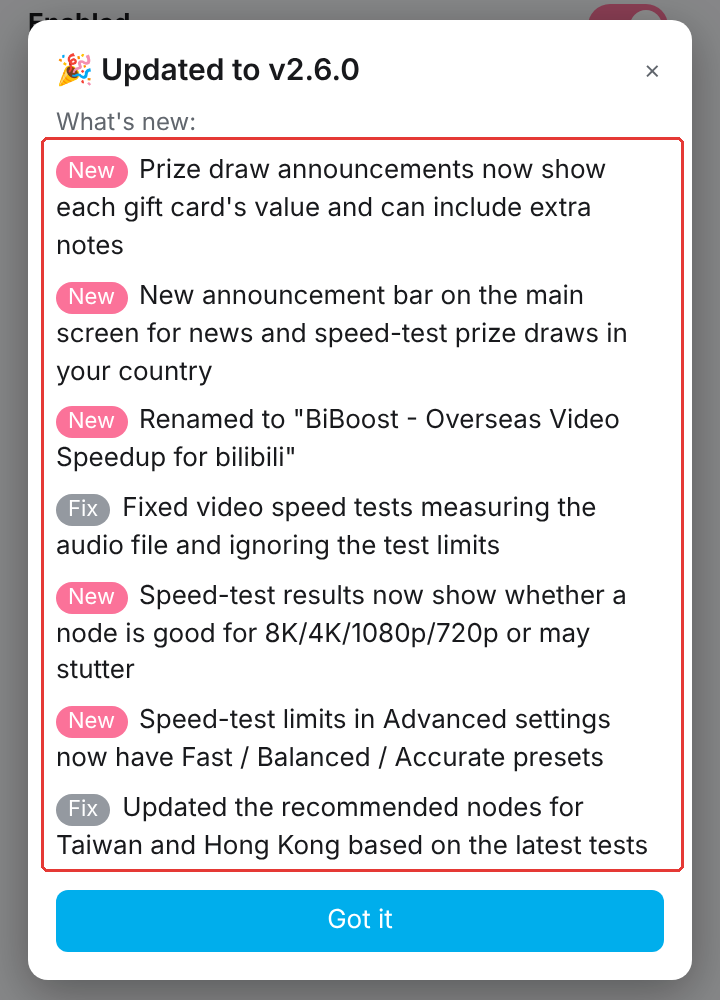
(Captured with headless Chromium loading src/, with the installed version set to 2.4.0, so it lists the 7 entries from 2.5.0 and 2.6.0 combined.)
On a normal release, the release script (release.mjs prepare, covered later) moves unreleased out before packaging, so it's already empty. But zips get built outside releases too: dist/ is committed, and I run npm run build between releases. At that point unreleased holds release notes nobody has announced yet. The dialog ignores them, so in the zip they do nothing except tell whoever unzips it what the next version will say. (To be fair, the feature code itself is already in src/ and goes into the zip anyway; this step can't stop that. It only keeps the notes inside the zip in line with what the stores have announced.) So build.mjs empties it on every build and keeps only releases:
// changelog.json 的 unreleased 是尚未上架的功能,不該隨 zip 外流,只留已上架的 releases
// (unreleased = not shipped yet; don't leak it in the zip, keep only releases)
const changelog = readJson(path.join(SRC, "changelog.json"));
const changelogBuf = Buffer.from(JSON.stringify({ unreleased: [], releases: changelog.releases }, null, 2) + "\n");
When the dialog should and shouldn't appear (not for new users, not on the same version, version only saved after it's dismissed...) is covered by scripts/test-whats-new.mjs, which launches a real Chrome via puppeteer, loads src/ and checks each case.
Forgot to write it? pre-push says no
The thing I forget most while coding is the changelog. Change, commit, push. Three days later at release time, nothing about it is written down.
So the repo has .githooks/pre-push (npm install sets core.hooksPath automatically). On push it compares the pushed commit with the commit the branch forked from. If src/changelog.json didn't change, it stops and asks:
Ignore and push: No/Yes [y/N]
Default is No. If it really was just scripts or docs that users never see, hit y, or skip the check with CHANGELOG_CHECK_IGNORE=1 git push.
It compares the whole branch, so once any commit on a branch touches the changelog, later pushes on that branch pass. It catches the most common case, a whole branch with no entry at all, not every single commit.
With no terminal to ask (an AI agent, CI), it always blocks. On purpose: most of this code is written by Claude Code, and before pushing it has to decide whether the change needs an entry. If it's unsure, it asks me. It doesn't get to skip the check on its own. That rule lives in the repo's agent.md. Anyone can set an environment variable; the hook stops slips, not intent. The rule covers the rest.
Here's the real output from a copy of the repo: change one line of popup.js, leave the changelog alone, push (run in a cloud container, so there's no terminal to ask and it just blocks; I replaced the base commit's sha with <base>):
$ git push origin fix/popup-typo
相較於 <base>(分支出來的基準),這次 push 改了 1 個檔案,但 src/changelog.json 沒有任何變動。

No new features/bugs found. Please check if any changes need to record.
請把使用者看得到的新功能/修正寫進 src/changelog.json 的 unreleased。
error: failed to push some refs to '../origin.git'
(The Chinese lines say: "Compared with the fork point, this push changes 1 file but src/changelog.json is untouched" and "Add user-visible features/fixes to unreleased in src/changelog.json".)
With a terminal, it asks. Same kind of repo copy, pushing to a fake local remote, and I just hit Enter at the prompt (which means No):
![Git Bash: git push stopped by the pre-push hook, red box around Ignore and push: No/Yes [y/N]; after Enter it prints that the push was cancelled](/docs/bilibili-extension-release-pipeline/assets/02-pre-push-blocked.png)
(The last line says "Push cancelled: update src/changelog.json, then push again.")
When the changelog did change, the hook validates it too: every entry needs zh_TW / zh_CN / en / ja / ko, versions newest first, dates as YYYY-MM-DD. Miss one language and the push still fails.
Store screenshots: let the script shoot them
Store screenshots go stale faster than anything else. Move one button and every screenshot in 5 languages across every store needs a reshoot. By hand? After one round of that I'd never want to touch the UI again.
So a script takes them: puppeteer loads the latest src/, opens a real Bilibili video page, switches languages one by one, and captures the store shots. It's the real UI from the current source, not a mockup, so one rerun puts the screenshots back in sync with the code.
That script lives in a private repo alongside the store copy (.claude/skills/store-screenshots/capture.mjs). The public repo only shows the settings it needs: BILI_COOKIE in .env.local (logged in gets you high-quality video; without it you're stuck at 480P) and an optional LIVE_ROOM (room number for the live-stream page shot).
A run has four steps, and each can be reshot on its own:
- ui: the popup's main screen (light and dark theme), country and node, advanced settings. One set per language, and one each for Chrome and Safari (the Safari set uses the app name and has no rating button).
- speedtest: the speed-test page. It really tests once, then switches the popup's UI language and feeds the same results back in for each shot, so all 5 languages show the exact same nodes, numbers and gold crown.
- video: the same 4K video played on the slowest node and on the fastest node, capturing the real numbers from the debug overlay for a before/after.
- mobile: the mobile Bilibili page used as the iPhone background.
Those are raw captures. A second script, compose.mjs, lays them out at the sizes the stores want: 1280x800 shared by Chrome, Edge and Firefox, 2560x1600 for the Mac App Store, 1290x2796 for iPhone, 2732x2048 for iPad. Five languages per set, five shots per language, under store/screenshots/<set>-<width>x<height>/. A full run takes about 15 to 20 minutes.
Here's shot 3 at 1280x800 (the speed test) in all 5 languages. The red boxes are the parts of the popup that change with the language. Look further down the node list: not one number moves.
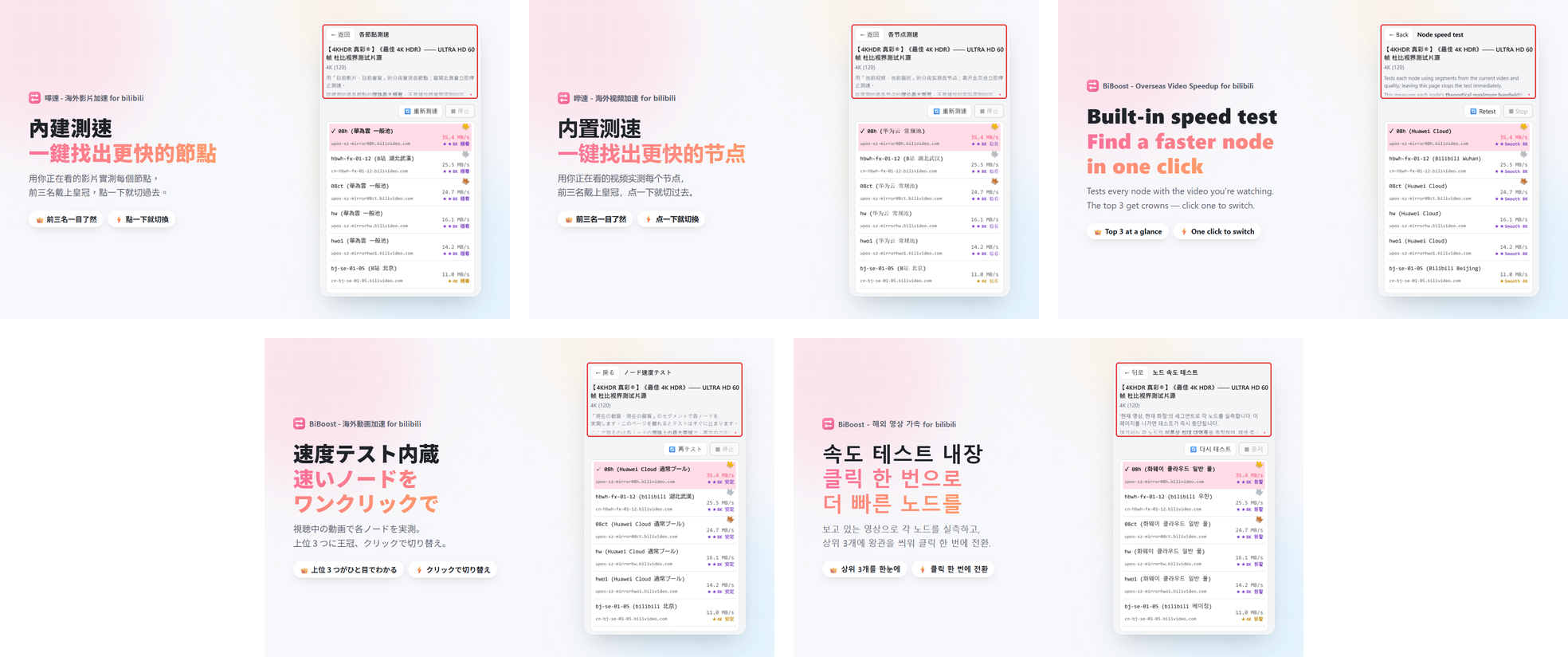
Screenshots don't change often, though, and /release doesn't reshoot them. I run it by hand after a big UI change. It writes to a temp folder first and builds an overview sheet for me to check, and only after I say OK does anything move into store/.
Safari: same pipeline, more hoops
Someone on a forum once asked if there was a Safari version. My answer: "No Mac, can't build it......QQ". I did it anyway: generate the Xcode project once, commit it to the repo, and hand building, signing and uploading to GitHub Actions' macOS runners. No sitting in front of a Mac for every release.
The Xcode project came out of xcrun safari-web-extension-converter, run once on a borrowed Mac. It references the repo's src/ through relative paths instead of copying files, so editing src/ needs no syncing.
When src/ gets a new file, the Xcode project needs a reference to it too. I haven't touched a Mac for that since: Claude Code edits project.pbxproj directly on Windows (like on Oct 7, when background.js, i18n.js and theme.js got added). Hand-editing a pbxproj sounds terrifying, which is why there's a CI check below that proves it still builds.
Safari shares src/ with the other three, but brings a few problems of its own.
The name can't contain "bilibili"
The app name can't use "bilibili", which is someone else's brand, and the App Store name has to match what's shown after install (the rename script's comment cites guidelines 4.1(c) and 2.3.8). Meanwhile the Chrome, Edge and Firefox versions need to keep "for bilibili".
src/_locales can't change, because the other three use it. Instead, the Xcode extension target has a build phase that runs scripts/safari-ext-name.py and edits only the locale files copied into the .appex:
EN = "BiBoost - Video Speedup"
NAMES = {
    "zh_TW": "嗶速 - 海外影片加速",
    "zh_CN": "哔速 - 海外视频加速",
    "en": EN, "ja": EN, "ko": EN,
}
# extName, popupHeaderTitle and extActionTitle all become the app name
Another build phase copies the production icons into the .appex (same as the zips, no red dev dot).
Every PR checks that it still builds
.github/workflows/safari-build.yml: when a PR touches src/, safari/, the production icons or the rename script, a macOS runner builds both macOS and iOS with xcodebuild (unsigned, no upload) and checks:
- The app display name is
BiBoost - Video Speedup - Every file and folder under
src/exists in the.appex(if not, the Xcode project isn't referencing a new file) - No language's
extNamecontains "bilibili" git diff --exit-code -- src/: the build must not modifysrc/
The second check earns its keep. Add a new JS file to src/ and Chrome has it instantly, but the Xcode project needs the reference added by hand. Forget it and the Safari build silently ships without that file, with zero error messages, until a user reports it broken.
Uploading to the App Store: two CI signing traps
.github/workflows/safari-appstore.yml is triggered manually (Actions › Safari App Store › Run workflow). A macOS runner archives, signs and uploads to App Store Connect. The App Store Connect API key sits in repo secrets, is written to a temporary .p8 file during the run, and is deleted afterwards.
Trap one (macOS): an automatically signed archive uses a development certificate. Every CI run is a fresh machine with no private key in the keychain, so Xcode requests a new certificate from Apple each time. Once the account hits its limit, archiving fails. The fix: archive with ad-hoc signing (needs no certificate; entitlements like App Sandbox are still written into the signature), then re-sign with the cloud-managed distribution certificate at export. The workflow also checks that both the .app and the .appex carry App Sandbox, since the App Store rejects builds without it.
Trap two (iOS): an automatically signed archive first asks for an iOS development provisioning profile, which needs a registered physical device. CI doesn't have one. So iOS archives unsigned and gets signed with the distribution certificate at export (the App Store build only cares about the export signature).
Each upload also needs a higher build number than the last, so CI adds the GitHub run number to the build number in the project. After upload, Apple still has to process the build. A separate asc-status.yml queries the App Store Connect API for processing status and TestFlight setup (read-only).
A finished run looks like this. Both the iOS and macOS jobs pass, and each job's Summary says which version and build it uploaded:
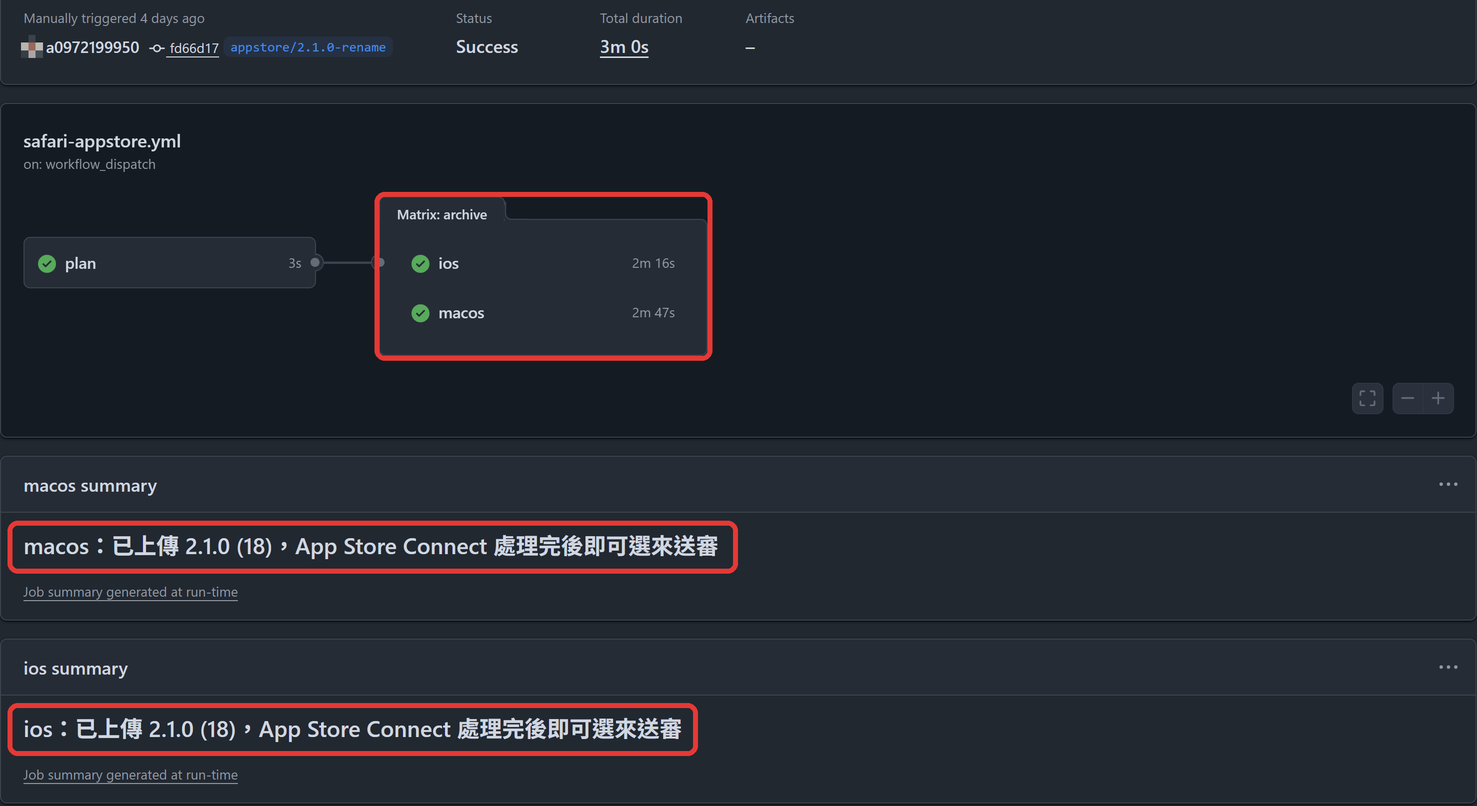
(The Summary lines read "Uploaded 2.1.0 (18); pick it for review once App Store Connect finishes processing.")
One /release, from src/ to four stores
All those pieces get wired together by a Claude Code skill, /release (the skill itself lives in the private repo). I say minor or patch, and it runs in order. If any step fails it stops and reports instead of pushing on:
- Preflight: must be on master with a clean tree, the changelog must validate, and
unreleasedcan't be empty (nothing to release). - Bump: it lists the
unreleasedentries and asks me major, minor or patch (minor suggested if there's a feature, patch if it's only fixes). Then it creates arelease/x.y.zbranch and runsnode scripts/release.mjs prepare x.y.z: the wholeunreleasedbatch moves into the new version (dated today), andmanifest.json,manifest.firefox.jsonand the Xcode project's version all get the new number. - Store copy: it updates the feature list in
store/description-*.md(4 platforms × 5 languages = 20 files) for this version. Only features users would actually want go in; bug fixes and performance tweaks don't. A fixes-only release leaves the copy alone. - Package, test, commit:
npm run package(scripts/package.mjs) calls thebuild.mjsfrom earlier twice, once for the three store zips indist/and once for the offline files inrelease/(no version in the file names), then adds the Windows speed-test tool. The update-prompt tests run next, and only if they all pass does it commitrelease: vx.y.z. - Upload drafts:
npm run publish-storespushes the zips through each store's API. - Update the dashboards: if the copy or screenshots changed this version, Playwright opens the three dashboards and fills them in (next section).
- GitHub Release: push the branch, tag it, and
release.mjs notesgenerates bilingual (zh/en) notes from the changelog. Creating a Release is public, so it shows me the file list and the notes first and only uploads after I say yes. - Merge back into master (you can see
Merge release/2.6.0ingit log).
Safari isn't part of this run. Its version number is synced in step 2, and when it's time for the App Store, I go to Actions and press Run workflow myself.
I press Publish. Always.
agent.md has one hard rule: the store "Publish" button is always pressed by me. The agent never presses it.
Why? Once it's out, it's out. Ship the wrong build and users auto-update to something broken, and store review means another trip through the queue. I'll happily click one extra button.
The Publish button is my choice. Some things, though, the APIs simply can't do (as of October 2026, per the comments in publish-stores.mjs): the Chrome and Edge APIs can't change listing copy or images, so those have to be changed in the dashboard. In /release that step is Playwright driving a browser through the dashboards: one language at a time, paste the copy, swap the screenshots, press "Save draft" and nothing else, then reload and read everything back to compare against the files word for word. Logins and 2FA I type myself in the Playwright window. Both APIs do have publish endpoints; I deliberately don't wire them up.
| Store | What the script does | What I do |
|---|---|---|
| Chrome Web Store | Upload the zip as a draft; if copy or screenshots changed, Playwright fills them in and saves the draft | Review the draft, hit Submit for review |
| Edge Add-ons | Same | Same; plus the API key expires roughly every two months and has to be regenerated in the dashboard |
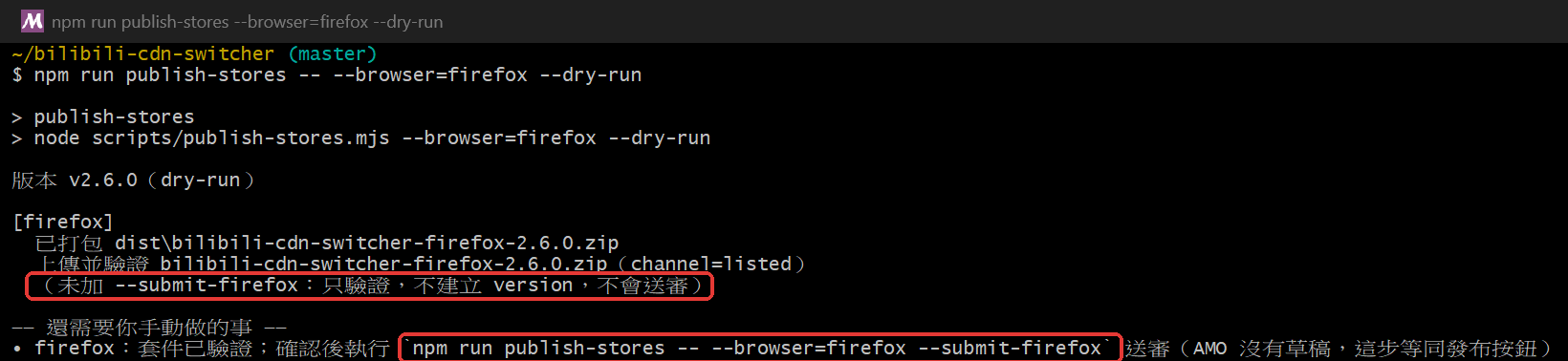
| Firefox (AMO) | Upload and validate; once I agree, --submit-firefox creates the version and writes the release notes and listings per language | AMO has no drafts: creating a version is submitting for review, so that call is mine |
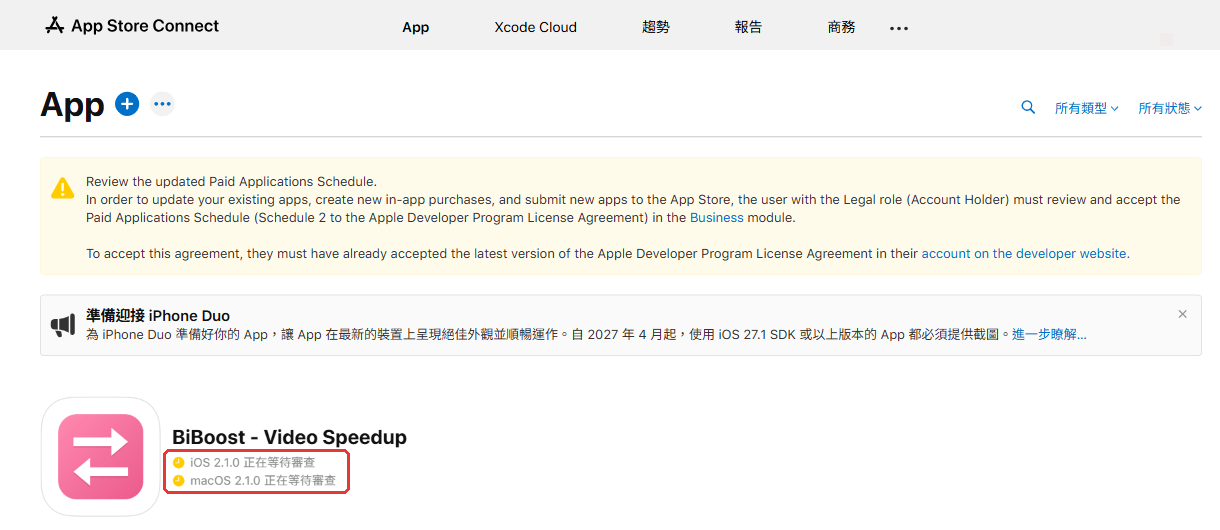
| App Store | CI uploads the build | Pick the build in App Store Connect and submit for review |
So publish-stores.mjs never publishes by default: Chrome and Edge go to drafts, Firefox only validates. At the end it prints what's left for me to do. Real dry-run output (IDs redacted; the script's messages are in Chinese, summarized below):
$ node scripts/publish-stores.mjs --dry-run
版本 v2.6.0(dry-run)

[chrome]
  已打包 dist/bilibili-cdn-switcher-chrome-2.6.0.zip
  上傳 bilibili-cdn-switcher-chrome-2.6.0.zip → https://chromewebstore.googleapis.com/upload/v2/publishers/<CWS_PUBLISHER_ID>/items/dfaddcffoondcendifiljhdbdagebgch:upload(只到草稿,不發布)

[edge]
  已打包 dist/bilibili-cdn-switcher-edge-2.6.0.zip
  上傳 bilibili-cdn-switcher-edge-2.6.0.zip → https://api.addons.microsoftedge.microsoft.com/v1/products/<EDGE_PRODUCT_ID>/submissions/draft/package(只到草稿,不發布)

[firefox]
  已打包 dist/bilibili-cdn-switcher-firefox-2.6.0.zip
  上傳並驗證 bilibili-cdn-switcher-firefox-2.6.0.zip(channel=listed)
  (未加 --submit-firefox:只驗證,不建立 version,不會送審)

—— 還需要你手動做的事 ——
• chrome:到 https://chrome.google.com/webstore/devconsole 確認草稿 → 貼上 store/description-chrome-{zhtw,zhcn,en,ja,ko}.md 的各語言簡介(API 不能改文案/圖片,圖片在 store/*.png)→ 自己按「發布」
• edge:到 https://partner.microsoft.com/dashboard/microsoftedge/overview 確認草稿 → 貼上 store/description-edge-{zhtw,zhcn,en,ja,ko}.md 的各語言簡介(API 不能改文案/圖片,圖片在 store/*.png)→ 自己按「發布」
• firefox:套件已驗證;確認後執行 `npm run publish-stores -- --browser=firefox --submit-firefox` 送審(AMO 沒有草稿,這步等同發布按鈕)
(Chrome and Edge: draft only. Firefox: validated, not submitted. The to-do list: paste the listing, press Publish; for Firefox, rerun with --submit-firefox.)
The expiring Edge API key is the annoying one. An expired key just gives you a 401 on upload, which is easy to mistake for something else. So .env.local also stores the expiry date: within 14 days publish-stores warns me, and once it's expired it stops and tells me where to regenerate it.
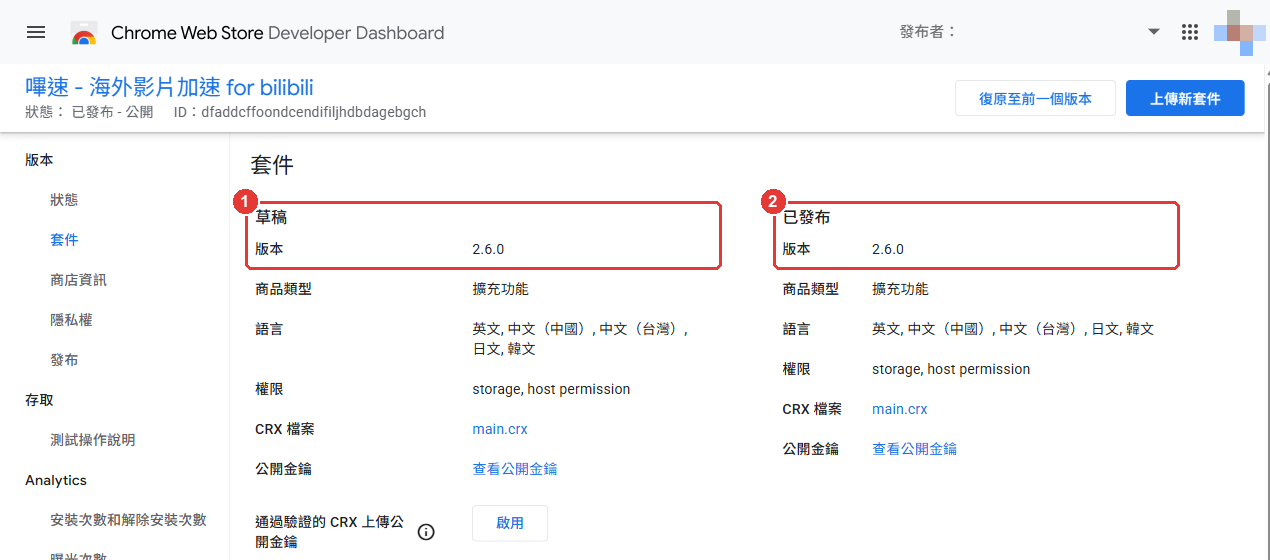
Here's where each store hands the last step to me (taken October 19, 2026, after 2.6.0 had already shipped, so Chrome and Edge show the draft and the live version on the same release). The dashboards are in Traditional Chinese because that's my account's language.
Chrome: ① on the left is the draft, the only column a publish-stores upload touches. ② on the right is the live version, which only changes after I submit and review passes:
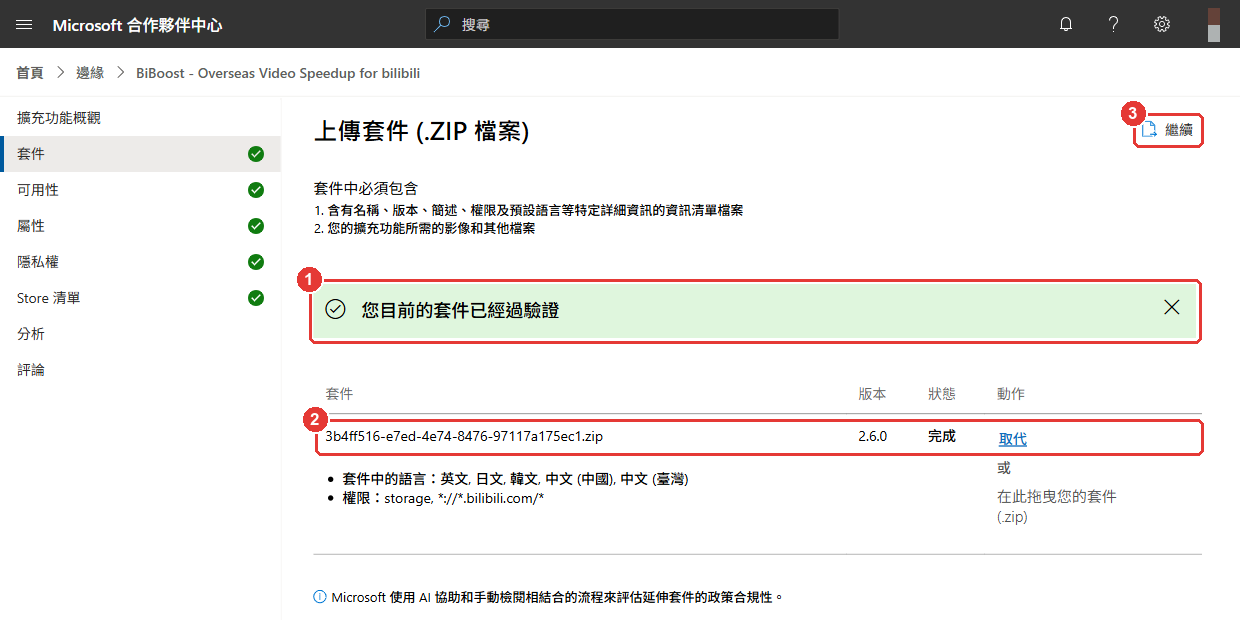
Edge: after the API upload you get ① "your package has been validated", ② is the package version in the draft, and from ③ Continue in the top right all the way to Publish, that part is me:
Firefox: no dashboard to show, just the terminal. This is --dry-run (no API calls). The top box says it only validates and won't submit; the bottom box is the command I'd have to run myself to submit:
App Store: once the CI build finishes processing, I pick it in App Store Connect and submit. Right now 2.1.0 is waiting for review on both platforms:
What I'd improve next
- Add a
.gitattributesrule forcing LF insrc/, so the reproducible build truly doesn't care which machine runs it. - Actually wire up the "rebuild in CI and compare hashes" check from earlier. Right now the zips in
dist/are still committed by hand. - Fix the comment on the
platformline inbuild.mjsto say what it really is (insurance, not a requirement).
Running four stores solo isn't about remembering everything. It's about making sure every missed step has something that yells. The one step nothing can yell about (pressing Publish) I just keep for myself.