Once you pin a CDN node, nobody switches it for you when it breaks. Here's how the extension decides a node is really broken, switches once on its own, and only asks you when that isn't enough.
My extension (BiBoost) does one simple thing: after Bilibili hands out a video URL, it swaps the CDN node in that URL for the one you picked, and keeps it there.
Pinning the node is the whole point. It's also the problem.
Bilibili's player has its own fallback. Every track in the playurl response comes with a baseUrl plus a list of backupUrls, and the player moves down the list when the main one fails. But the extension rewrites the host of every segment request to your chosen node (how the fetch/XHR hook works is covered in another post), so when the player tries a backupUrl, it gets rewritten right back. I've effectively switched off Bilibili's native fallback.
So when the node breaks, the extension has to notice and switch on its own.
Switching is easy. Knowing when to switch is the hard part.
What counts as "the node is broken"
The extension watches three signals:
- A segment request fails: HTTP 403, 404, 451 or any 5xx, or the request throws a network error (can't connect, connection reset).
- The video element errors out: the main player's
<video>fireserror(decode or source error). Errors from the little hover-preview videos on the page are ignored. - The picture freezes: time stops and the buffer ahead is empty. This one is the trickiest, so it gets its own section below.
function isFailureStatus(status) {
  return status === 403 || status === 404 || status === 451 || (status >= 500 && status < 600);
}
What about timeouts? I don't put a separate timeout on each segment request. If requests keep going out and nothing comes back for 5+ seconds, that "dead line, no error" case gets caught by the stall detector anyway. Same result, one less timer to maintain.
Errors that aren't the node's fault
My first instinct was simple: 403 means the node is refusing you, so switch. In practice, plenty of errors have nothing to do with the node, and switching on every one just interrupts playback that was fine.
The three filters below apply to failed segment requests, since that's the only signal with a status code and a URL to inspect.
1. A 403 on an expired URL isn't the node's fault
Bilibili's segment URLs are signed, with a deadline (unix seconds) in the query. Pause a video, come back later, and the URL has expired. Every node returns 403. Switching nodes does nothing here; the player needs to fetch a fresh playurl.
function isExpiredUrl(url) {
  var dl = new URL(url, location.href).searchParams.get("deadline");
  return !!dl && parseInt(dl, 10) * 1000 < Date.now();
}
When the fresh playurl passes through the hook, resetFallbackState() runs and clears both the stall timer and the switch budget, so everything starts over.
To be honest, this only blocks the status-code path. The stall detector doesn't know why playback stopped. If the player hasn't fetched a new URL within 8 s and the picture stays frozen, the stall path still fires and still switches nodes. And the switch uses player.reload(), which keeps the old playurl (more on that below), so this switch can't fix the expiry. It just burns the one automatic attempt. I'm fine with that trade-off: all the stall detector sees is "frozen, no data coming in", and it can't tell expiry from a dead node. One extra switch beats leaving a genuinely broken node stuck.
2. Segments that didn't hit the current node don't count
When you've picked a specific node ("named node" mode in the code), only failures on that node count. The usual case is right after a switch: requests still in flight to the old node fail, and that shouldn't be blamed on the new one. In the other two modes the whole auto-switch flow is off: "Original" doesn't touch the host and plays whatever Bilibili hands out, and "Backup URL" prefers Bilibili's own backup URLs, which is already the last step described below.
Deciding what even counts as a segment bit me too. Bilibili's analytics beacons (data.bilibili.com) stuff segment URLs into their query string. The old check only looked at the path, so analytics requests got counted as segments and polluted the failure logic. Now a segment must also be on a CDN host.
3. Requests the player aborted itself don't count
Seek or change quality and the player aborts in-flight segment requests; fetch throws AbortError. That's normal behavior, not a broken line.
Put together, that's the bar a failed segment request has to clear (the network-error path skips the expiry check since there's no status code, but it also only counts the current node and also ignores AbortError):
function shouldFallbackOnStatus(status, url) {
  if (!isFailureStatus(status)) return false;
  if (status === 403 && isExpiredUrl(url)) return false; // expired signature: switching won't help
  return isCurrentSegHost(hostOf(url));                  // only the current node counts
}
On Mobile01 someone once asked "why does the video keep switching to the Backup URL halfway through?" (Fixed in 1.4.0.) Switching too eagerly has real costs: the picture blanks, the buffer you already downloaded is thrown away, and you might land on a slower node.
Detecting a stall
A failed request at least gives you a status code. A stall gives you nothing; you have to infer it from the player's state.
Once a second, the extension checks the main player's currentTime:
- Time is moving: reset the timer, all good.
- Time has stopped: start the timer. How long to wait depends on whether any data arrived in the last 5 seconds:
- Nothing arriving: 8 seconds frozen and it's a stall.
- Data still trickling in (just slowly): wait up to 20 seconds. This grace period is what catches the case where the audio track is alive but video is dead. Without it, "something is still downloading" would mean it never counts as a stall.
Sounds obvious. Every exception in there was forced on me by a false positive.
"No traffic for a while" is not a stall
An older version worked exactly like that, and it was a disaster. Once the player's buffer is full, it stops fetching segments. No traffic is the normal state. The old version would decide the video was stuck about 18 seconds after the buffer filled up, and reload a page that was playing perfectly fine. (Your own extension refreshing the video you're watching. Great.)
So the main signal is now currentTime not moving. Traffic only decides whether to wait 8 or 20 seconds.
Two kinds of pause
If you hit pause, time obviously stops, and that's not a stall. But on anime (bangumi) pages, after being stuck for a while, the player sets the video back to paused by itself. If "paused" always meant "skip", that case would never get caught.
The tiebreaker is the forward buffer: if more than 0.5 s of downloaded data sits ahead of currentTime, playback could resume any moment, so you paused it. A pause with an empty buffer keeps the timer running.
function hasForwardBuffer(v) {
  var bf = v.buffered;
  for (var i = 0; i < bf.length; i++) {
    if (v.currentTime >= bf.start(i) - 0.1 && v.currentTime < bf.end(i) - 0.5) return true;
  }
  return false;
}
Videos that haven't started yet
readyState 0 (no media data yet) usually means the video is still loading, or the player is rebuilding after a node switch. Not a stall. One exception: segment requests have gone out in the last 10 seconds, but nothing has arrived for 5+ seconds. That's a dead line right from the start, so the timer runs anyway.
And of course, a video that has ended isn't stalled.
Switch quietly first, ask only if that fails
A failed segment request has to pass the three checks above first; stalls and video errors have no URL to check, so they go straight on. Next, if a switch happened in the last 30 seconds, it waits (the next section explains why). Then it handles things in two steps.
First time: switch to a backup node Bilibili already gave you
While rewriting the playurl, the extension also records the hosts from Bilibili's original baseUrl and backupUrls (skipping PCDN, the flaky .mcdn. nodes). On the first failure, it picks the first host on that list that isn't the current node and hasn't been tried yet.
How it switches matters too:
- It calls
player.reload()inside the player. That keeps the existing playurl and doesn't fetch new URLs, but the new segment requests still go through the hook and get the new node's host. No page refresh, fullscreen stays on, and playback jumps back to where you were. - It only changes the node this tab is actually using (
autoHostin the code). Your settings are untouched. The popup still shows your pick, and a manual refresh goes back to it. - A 3-second toast appears at the top center of the player: "Current CDN is slow; switched to backup node {host}". (It always says "slow", even when the real cause was a 403 or a decode error.)
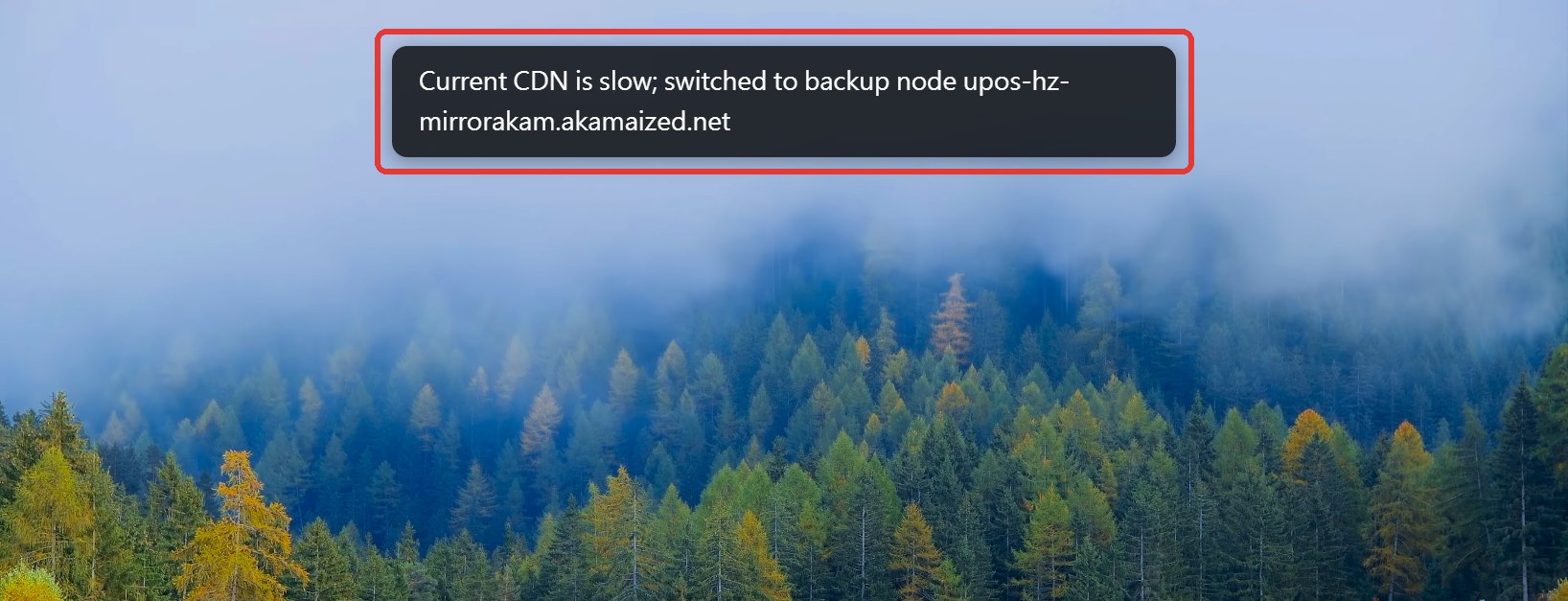
"Quietly" isn't completely quiet: the picture blanks for a moment while the player reloads, so it still tells you where it went. Quiet means you don't have to do anything, and your settings stay as they were.
Second time: ask you
If the backup node can't play either (or there was nothing on the list to switch to), the extension stops acting on its own and shows a prompt that doesn't go away by itself:
"Playback isn't smooth on either the current CDN or the backup node", with two buttons: "Reload and switch to Backup URL" and "Close".
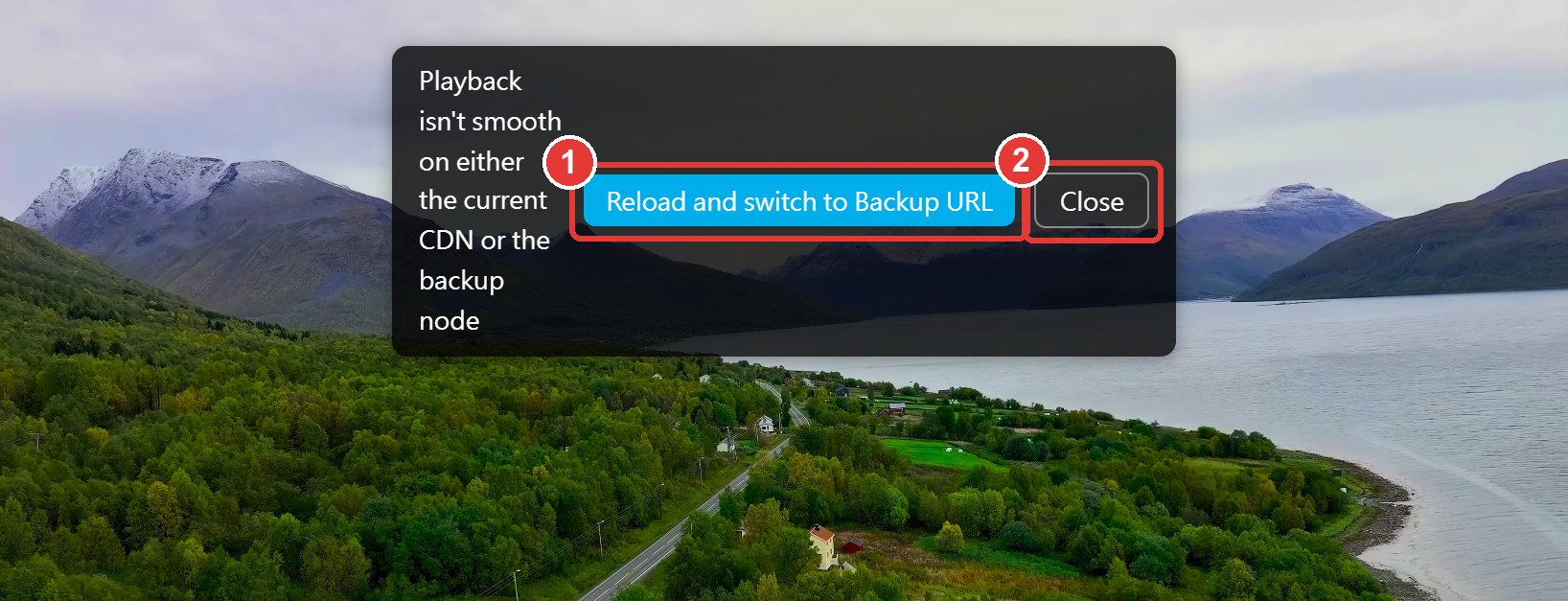
Why ask at this step? Backup URL mode doesn't swap hosts at the segment level. It reorders the playurl response so Bilibili's backupUrls come first. player.reload() reuses the old playurl and never touches that layer, so the only way in is a full page reload that fetches a new playurl. That feels very different from an in-player reload: the whole page loads again. This step used to happen automatically. Now it waits for your click. Once it has asked, this round's budget is used up, so the same stall won't trigger a second prompt.
If playback starts moving again, the prompt closes itself. No need to dismiss it.
Not bouncing between nodes
The worst case for auto-switching is A breaks, go to B, B hiccups, go to C, C hiccups, back to A, and the screen keeps going black. Four limits prevent that:
- Two attempts per round (
FALLBACK_MAX_ATTEMPTS = 2): the first is an automatic switch, the second is the prompt. After asking, the budget is maxed out and it won't act on its own again this round. - Never retry a tried node: before each switch the current node goes into
tried, and the backup pick skips it. - 30-second cooldown (
FALLBACK_COOLDOWN_MS = 30000): errors within 30 s of a switch are ignored. The stall detector keeps running during the cooldown, firing roughly every 9 to 10 s (the timer restarts after each detection; that's the 8 s threshold plus the slack of checking once a second), it just doesn't act; the first detection after the cooldown ends is the one that counts. That number comes from testing. Afterplayer.reload(), 4K sometimes takes more than 20 s to start moving again. With a shorter cooldown, the new node gets blamed before it has even buffered, and you jump straight to "can't play on either". - 30 seconds of smooth playback starts a new round: 30 s of uninterrupted playback means the line really has recovered, so attempts and
triedare cleared. That applies even after the prompt; a later stall starts a fresh round (auto-switch first, then ask). With 30 s of smooth playback in between, it isn't bouncing. A new video (a new playurl) resets it too.
Also, if you change the node yourself in the popup, any automatic override is dropped. Your choice always wins.
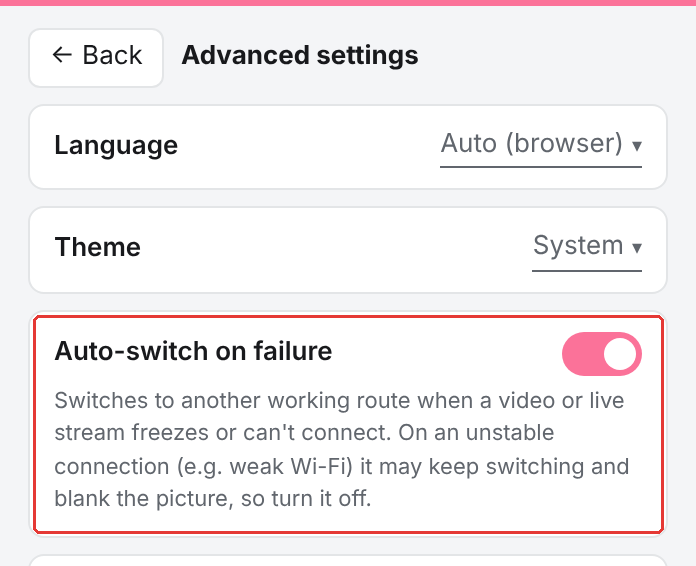
If your connection itself is unstable (say, weak Wi-Fi), dropouts aren't the node's fault, and auto-switching just keeps blanking and reloading the picture. In that case, turn off "Auto-switch on failure" in the advanced settings (on by default; the toggle was added in 1.5.0):
Live streams work differently
Live streams (live.bilibili.com) have a completely different route structure, so they get their own fallback.
Live stream hosts look like d1--{ov|cn}-gotcha{N}[b].bilivideo.com. Each cluster number N has four variants: international ov, international backup ov-b, China cn and China backup cn-b (ov-b means the host ending in ov-gotcha{N}b, same for cn-b), and the signature works across all four. Switching routes means rewriting the host to another variant with the same number. The annoying part: in some rooms, cn-b simply doesn't exist.
Rather than cycling through all four, the extension has one fixed fallback: the international route, ov. ov is also the extension's default route, and the code falls back to it whenever other routes can't be found.
- Retry on the spot: if a stream request with a rewritten host fails (DNS failure, 403 and so on), the extension immediately retries with the page's original URL (the route Bilibili's API assigned). If that works, all later requests go to ov. Note: not to the route that just succeeded. The code doesn't remember which route was original; this shares the same "fall back to ov" override as the stall path, so there's only one fallback to maintain. It all happens inside fetch, and the player never notices.
- Stalls: the same
checkStallas above, plus one live-only rule: the stream was requested more than 8 s ago and the video still has no data (readyState0). The line is up but nothing is streaming, so it counts as a stall. - Once a stall is detected, it switches to ov, shows "Live route is unstable; switched to International (ov)", and restarts the stream with
livePlayer.reload(). Same 30 s cooldown.
The big difference from videos: live never asks you. ov is the last route, so if you're already on ov there's nowhere to go and it does nothing. The override also only applies to the current room. Switch rooms and it starts over; your long-term route setting is never touched.
While the popup is open, the extension also probes which of the four routes exist for the current room (it takes the current stream URL, swaps the host, and counts a 2xx within an 8 s timeout as available). It only probes while the popup is open, so someone hopping between live rooms doesn't fire three extra connections every time.
Try it yourself
You don't need a broken network to watch the whole flow. Open DevTools on a Bilibili video page and run:
__cdnSwitcherSimulateStall()       // treat the next 60 s as stalled
__cdnSwitcherSimulateStall("ask")  // show the prompt right away
With the first line, after about 9 s it switches to a backup node and shows the toast. During the cooldown the stall detector keeps firing roughly every 9 to 10 s without acting; the first detection after the cooldown (somewhere between 40 and 50 s) brings up the "can't play on either" prompt. To run the whole flow again, the easiest way is to refresh or open another video; otherwise you'd have to wait for 30 s of smooth playback to restore the budget.
Since 2.4.0, the debug overlay also shows buffered seconds, the stall timer and the number of auto-switches. When you submit a bug report from the extension, the last 10 minutes of stall and switch records are attached automatically.
留言(0)
還沒有人留言,來當第一個吧!