Page.captureScreenshotreturns device pixels.click_xytakes CSS pixels. In between sits a devicePixelRatio, plus a client that quietly downscales the image. This is how my PR #55 to agent360 put the conversion back next to the screenshot, and the two fixes the maintainers added on top.
What agent360 is and why I use it is in the previous post. Not repeating it here.
The symptom
The test page was the-internet.herokuapp.com/checkboxes, target: the first checkbox. The route was agent360's escape hatch: take a screenshot, read the position off the image, click it with browser_click_xy (canvas UIs and pages too weird for selectors all end up here).
That's literally what the click_xy description said to do: "take a screenshot, read the button's position, click its center".
Result:
- Checkbox center read off the image:
(1129, 157), passed toclick_xy - Answer:
ok: true, landed: true - Checkbox: not checked
Off by about 450px. The same point converted to CSS, (685, 95), checked it.
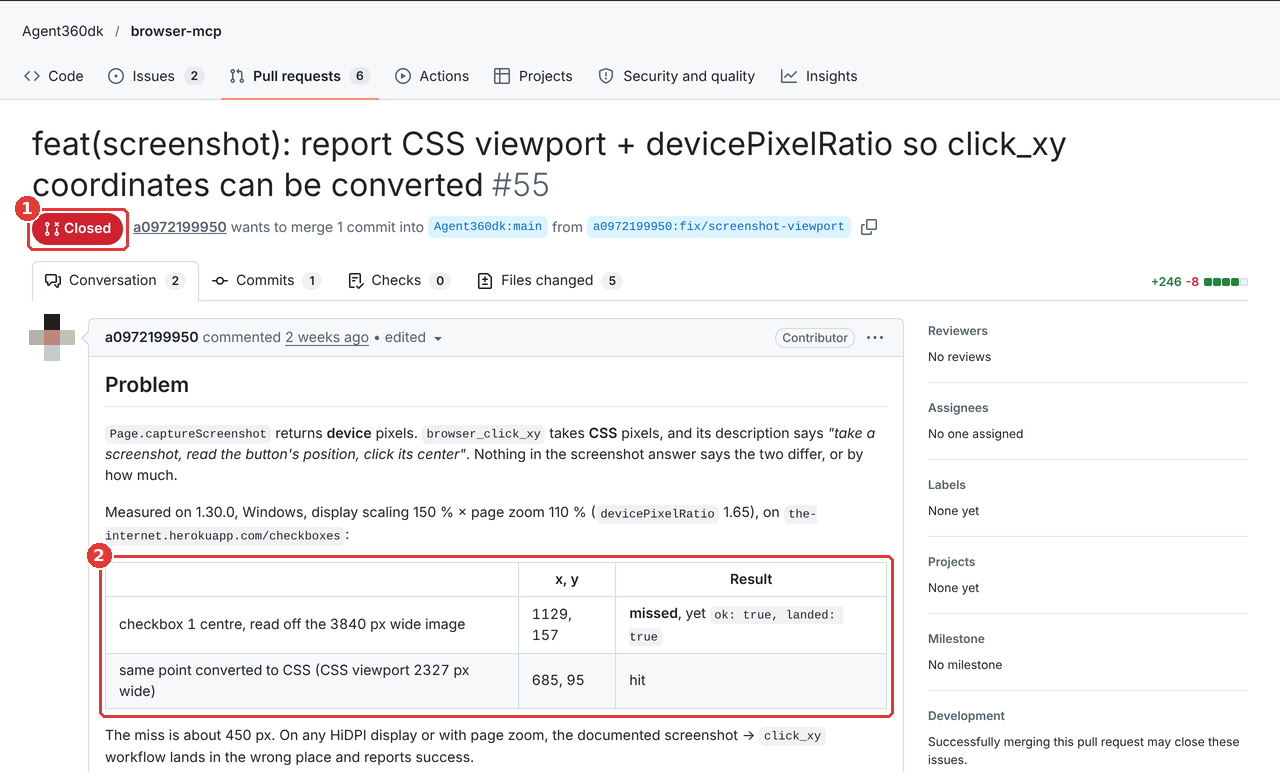
The annoying part is landed: true. It's the check agent360 attaches after a click, and it means "the click event actually reached the target element": nothing covered it, and it didn't vanish into an iframe or anywhere else the result can't be told. An agent reads it as "I clicked the thing I wanted", sees success and keeps going, drifting further off with every step.
So is click_xy lying? Not really. It has no idea what you meant to click. Its target is whatever element sits under that coordinate (document.elementFromPoint), the page background this time, and the click did reach it. The coordinate was wrong, not the click.
Why it misses: three rulers
My setup: Windows display scaling 150%, Chrome page zoom 110%.
Chrome's devicePixelRatio is the product: 1.5 × 1.1 = 1.65. One CSS pixel takes 1.65 physical pixels on screen.
And the two APIs use different units:
Page.captureScreenshot(CDP) returns a PNG in device pixels. Mine was 3840 × 1907.click_xysits onInput.dispatchMouseEvent, which takes CSS pixels. The CSS viewport was 2327 wide (its height wasn't measured separately; 1907 ÷ 1.65 puts it at about 1156).
3840 ÷ 2327 = 1.65. Checks out.
So x = 1129 read off the image and clicked as-is lands at CSS 1129, while the checkbox is at 1129 ÷ 1.65 ≈ 684 (the click that hit used 685). Against that (685, 95), it's 444px sideways and 62px down, about 450px in total.
The offset isn't constant either: it grows toward the bottom-right (offset = coordinate × (1 − 1/1.65), roughly 40% of the coordinate). A button near the top-left might still get hit, so the bug doesn't show up every time. Which makes it worse.
And there's one more. Clients downscale images. An MCP client receiving a 3840 px image doesn't necessarily show it to the model at full size; one I hit showed it at 2000. Coordinates the model measures on that image are a third unit.
Stack the three rulers at the top-left (0, 0) and you can see why the offset grows toward the bottom-right:
The model only knows how big its own image is. How wide the CSS viewport is, or whether the image was downscaled, it has no idea. Guessing the devicePixelRatio on its own? Not happening.
Reproducible on Linux too
This isn't a Windows thing. Any HiDPI screen or page zoom triggers it. Headless Chromium with --force-device-scale-factor=1.65 and a 2327 px wide viewport (rounded to 3840 device pixels, which is why the CSS width reads back as 2327.27) gives the same widths: a 3840 × 1824 screenshot, cssVisualViewport 2327 wide.
const shot = await cdp.send('Page.captureScreenshot', { format: 'png' });
const png = Buffer.from(shot.data, 'base64');
console.log(png.readUInt32BE(16), png.readUInt32BE(20)); // 3840 1824

const m = await cdp.send('Page.getLayoutMetrics');
console.log(m.cssVisualViewport.clientWidth);             // 2327.27...
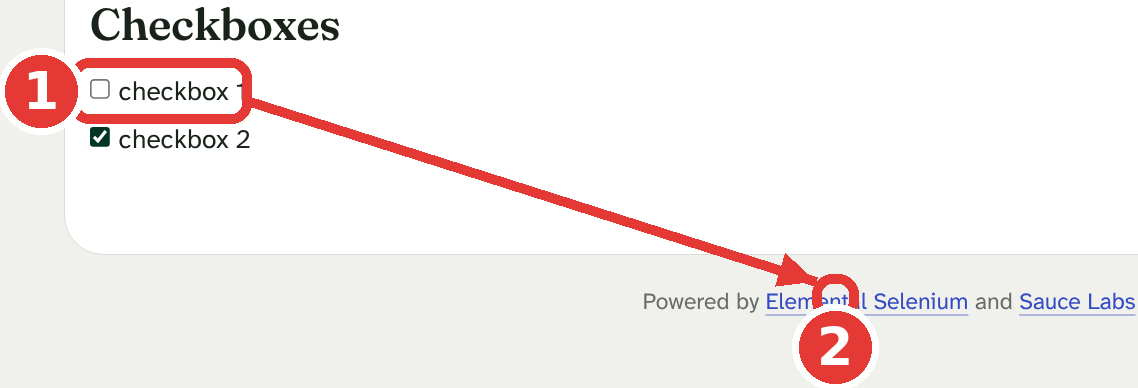
Linux fonts and layout differ from the Windows run, so the checkbox sits elsewhere: its center read off this image is (1131, 320). Clicking that as-is lands on a footer link and the checkbox stays unchanged; clicking the converted (685, 194) checks it:
The fix: a conversion note next to the screenshot
To convert, the model needs two things: the CSS viewport width, and how wide the image it's looking at is.
The server can't know the second one, since the client does the downscaling. But when the model reads a coordinate, it reads it off the image it was shown, so that image's width (W) is the ruler it measured x with. Some clients even say it outright: Claude Code, reading an image file with Read, adds a line like original 2560x1800, displayed at 2000x1406 (whether an MCP screenshot gets that line depends on the client). If the client didn't downscale, W is just the original width.
So the formula is written against "the width W the image is shown at", not a hardcoded 3840. The image 3840×... in the answer is the original width; on a client that downscales, using it as W is wrong, which is exactly why the formula says "shown W pixels wide". (To be fair, the PR's live test didn't separately verify the downscaled path. The formula is written this way so 3840 isn't baked in.)
The first one is the extension's job. The whole route:
Why CDP instead of window.devicePixelRatio?
The obvious move is to run a line of script in the page and read window.devicePixelRatio and innerWidth.
Except agent360 runs page scripts with chrome.scripting.executeScript in the MAIN world, and what it runs in the page then gets blocked by page CSP (the error is unsafe-eval). Not a guess: its code has a safeExecuteScript that catches Content Security Policy / unsafe-eval errors and falls back to the debugger, with a comment saying this is expected on Google, Stripe and Slack. When browser_extract_list gets blocked, its error message literally says "use screenshots instead". The blocked pages are exactly the ones where screenshots plus coordinates are all you have.
Page.getLayoutMetrics is a CDP command. The debugger is already attached for the screenshot, nothing runs in the page, CSP can't touch it, and one command returns both the CSS and the device numbers.
cssVisualViewport in the answer is the viewport size in CSS pixels; the same answer also has visualViewport, the same viewport in device pixels.
Why read the PNG IHDR?
The ratio should come from the image's own width, the most direct fact there is. A PNG carries its size in the header: an 8-byte signature, then the IHDR chunk's length and type, then 4 bytes of width and 4 of height. You need the first 24 bytes; the code takes the first 44 base64 characters (33 bytes decoded, enough), no need to decode the image:
function pngSize(dataUrl) {
  try {
    const b64 = String(dataUrl || '').replace(/^data:image\/png;base64,/, '');
    const bin = atob(b64.slice(0, 44));   // signature (8) + IHDR length/type (8) + width/height (8)
    if (bin.slice(12, 16) !== 'IHDR') return null;
    const u32 = (i) => ((bin.charCodeAt(i) << 24) | (bin.charCodeAt(i + 1) << 16) |
                        (bin.charCodeAt(i + 2) << 8) | bin.charCodeAt(i + 3)) >>> 0;
    return { width: u32(16), height: u32(20) };
  } catch (e) {
    return null;
  }
}
If the IHDR can't be read, it falls back to the device width from visualViewport (the extension always captures PNG, so this shouldn't happen). I checked pngSize against the raw capture from the measurement table: a 3840 × 1907 file, and pngSize returned { width: 3840, height: 1907 }, matching the file. (That height doesn't match 1105 × 1.65 from the later retest, most likely because the window height differed between the two runs; the width was 3840 / 2327 both times.)
What if the measurement fails? Don't take the screenshot down with it
The measurement is an extra. The screenshot is what the user asked for, and it must not fail because of the extra.
So Page.getLayoutMetrics runs inside a Promise.race with a 1.5 s cap; any error is swallowed, the function returns undefined, and the screenshot answer is exactly what it was before:
async function screenshotViewport(tabId, image) {
  try {
    let timer;
    const m = await Promise.race([
      cdpSend(tabId, 'Page.getLayoutMetrics', {}),
      new Promise((_, reject) => { timer = setTimeout(() => reject(new Error('timeout')), 1500); }),
    ]).finally(() => clearTimeout(timer));
    const css = m?.cssVisualViewport;
    if (!css?.clientWidth || !css?.clientHeight) return undefined;
    const png = pngSize(image);
    const deviceWidth = png?.width || m?.visualViewport?.clientWidth;
    if (!deviceWidth) return undefined;
    return {
      css_width: Math.round(css.clientWidth),
      css_height: Math.round(css.clientHeight),
      device_pixel_ratio: Math.round((deviceWidth / css.clientWidth) * 1000) / 1000,
      ...(png ? { image_width: png.width, image_height: png.height } : {}),
    };
  } catch (e) {
    return undefined;
  }
}
(That's my PR's version. What the maintainers changed comes later.)
The server's note
The extension attaches viewport to its answer, and the MCP server adds a text block after the image:
`Viewport: ${vp.css_width}×${vp.css_height} CSS pixels, devicePixelRatio ${vp.device_pixel_ratio}` +
(vp.image_width ? `, image ${vp.image_width}×${vp.image_height} pixels` : '') + '. ' +
`browser_click_xy takes CSS pixels: for a point at (x, y) in an image shown W pixels wide, ` +
`click (x / W × ${vp.css_width}, y / W × ${vp.css_width}).`
Note that y is also multiplied by css_width / W, not css_height / image height. Scaling is uniform, so the width ratio is the height ratio. One factor means one less number for the model to get wrong.
The browser_screenshot and browser_click_xy descriptions changed too, saying outright that the two coordinate spaces differ. Otherwise the model follows the old description and may never read the note.
Tests: red first, then green
test/screenshot-viewport.test.mjs has four tests, two per layer:
- Extension: a fake
chrome.debuggerwherePage.getLayoutMetricsreturns acssVisualViewport2327.27 wide and avisualViewport3840 wide. Asserts the answer hasviewportwithcss_width2327 anddevice_pixel_ratio1.65. - Extension:
Page.getLayoutMetricsthrows. Asserts the image is still there andviewportisundefined. - Server: runs the real
mcp-server/index.js, a fake extension over WebSocket answers with an image plusviewport. Asserts the text mentions2327×1105,1.65andbrowser_click_xy. - Server: without
viewport, the answer is the image alone, as before.
On the unfixed code, "no viewport in the answer" and "CSS viewport not stated" were red and the two keep-as-before cases green; after the change, 4/4 green.
Red first matters. A test that's green on the old code didn't test what you fixed.
The full suite had 10 failures on my Windows machine, the same 10 as on main, unrelated to this change (said so in the PR so nobody thinks I broke them). Then a live retest in real Chrome: the screenshot answer said 2327×1105 CSS pixels, devicePixelRatio 1.65, and clicking the point converted with that line flipped the checkbox from false to true.
The two fixes the maintainers added
I sent the PR on 10/4. On 10/7 the maintainers said main was frozen for a release, so no merges yet. On 10/12 they came back, said it fixed a real miss (a click read off the image landed on the page background and click_xy still said ok), and added two commits of their own on top.
1. A classic scrollbar skews the ratio
My ratio was "PNG width ÷ cssVisualViewport width". The screenshot includes the scrollbar; cssVisualViewport doesn't.
In their Chrome probe with a 16 CSS px classic scrollbar (the kind that takes up layout width, not an overlay one), the real ratio was 2 and my math said 2.033. A click near the right edge missed by up to 15px.
My PR comment literally said "the image's own width is the truth". Sounds right. But the numerator and denominator weren't measuring the same thing. Every step reasonable, the sum slightly off....
The fix takes the ratio from Chrome's two measurements of the same area: visualViewport (device pixels) ÷ cssVisualViewport (CSS pixels), neither including the scrollbar. The image's CSS size is then the image size divided by that ratio, scrollbar strip included:
const png = pngSize(image);
const dpr = m?.visualViewport?.clientWidth ? m.visualViewport.clientWidth / css.clientWidth
  : (png ? png.width / css.clientWidth : 0);
if (!dpr) return undefined;
return {
  css_width: Math.round(png ? png.width / dpr : css.clientWidth),
  css_height: Math.round(png ? png.height / dpr : css.clientHeight),
  device_pixel_ratio: Math.round(dpr * 1000) / 1000,
  ...(png ? { image_width: png.width, image_height: png.height } : {}),
};
css_width now means "the whole image's width in CSS pixels", which plugs straight into the server's x / W × css_width. The note still starts with Viewport:, though strictly the numbers are now the image's CSS size, not the viewport. Same name, new meaning; the model only needs the number anyway.
When png can't be read, css_width still falls back to cssVisualViewport (no scrollbar), so the scrollbar issue survives there. But as said above, the extension always captures PNG, so that path shouldn't be reached.
2. The measurement only gets what's left of the screenshot's budget
The server waits up to 30 s for the extension. If the capture itself took 29 s, my 1.5 s measurement on top pushed the answer past the limit. My "best-effort" guaranteed a failed measurement wouldn't break the screenshot, but not that a slow one wouldn't.
screenshotViewport now takes a maxMs, called with whatever is left of the screenshot's budget, and uses min(1500, maxMs). Nothing left, no measurement.
The maintainers' second point also carried a small change: the formula I wrote in the click_xy description was x_in_image / image_width * css_width, which didn't match the server's W-based note. They unified it on the shown width W. That one was me contradicting myself. Fair catch.
Where it ended up
PR #55 itself was closed, but the commit went into main through PR #60 with me still as the author, and shipped in 1.30.2. The CHANGELOG got a line:
a viewport note next to the image |
browser_screenshot| The CSS viewport and devicePixelRatio forbrowser_click_xy, when Chrome reports them in time (#55)
"when Chrome reports them in time" is what's left of the two best-effort decisions above.
If you're building browser tools for AI
The model won't question the units on its own. It'll just trust ok: true.
Want to check? Set Windows display scaling to 150%, ask Claude to take a screenshot with agent360, and look for the Viewport: ... line in the answer.
Comments(0)
No comments yet. Be the first to share your thoughts!