B 站把影片網址藏在好幾個地方。想換 CDN 節點,每一個地方都得搶在播放器讀到之前先動手。
我做的擴充「嗶速」只做一件事:B 站給完影片網址之後,把裡面的 CDN 節點換成你選的那個。為什麼要換、換哪個,上一篇講過了。
這篇講怎麼換。
程式碼都摘自 bilibili-cdn-switcher v2.6.0 的 src/main-hook.js。整支 1777 行,大部分是測速、自動切換跟除錯面板,真正負責「換」的是 installHooks 和它前面那幾個改寫函式。
為什麼一定要擠進 MAIN world
B 站播放器拿網址、抓影片,用的都是頁面自己的 window.fetch、XMLHttpRequest 和 window.__playinfo__。
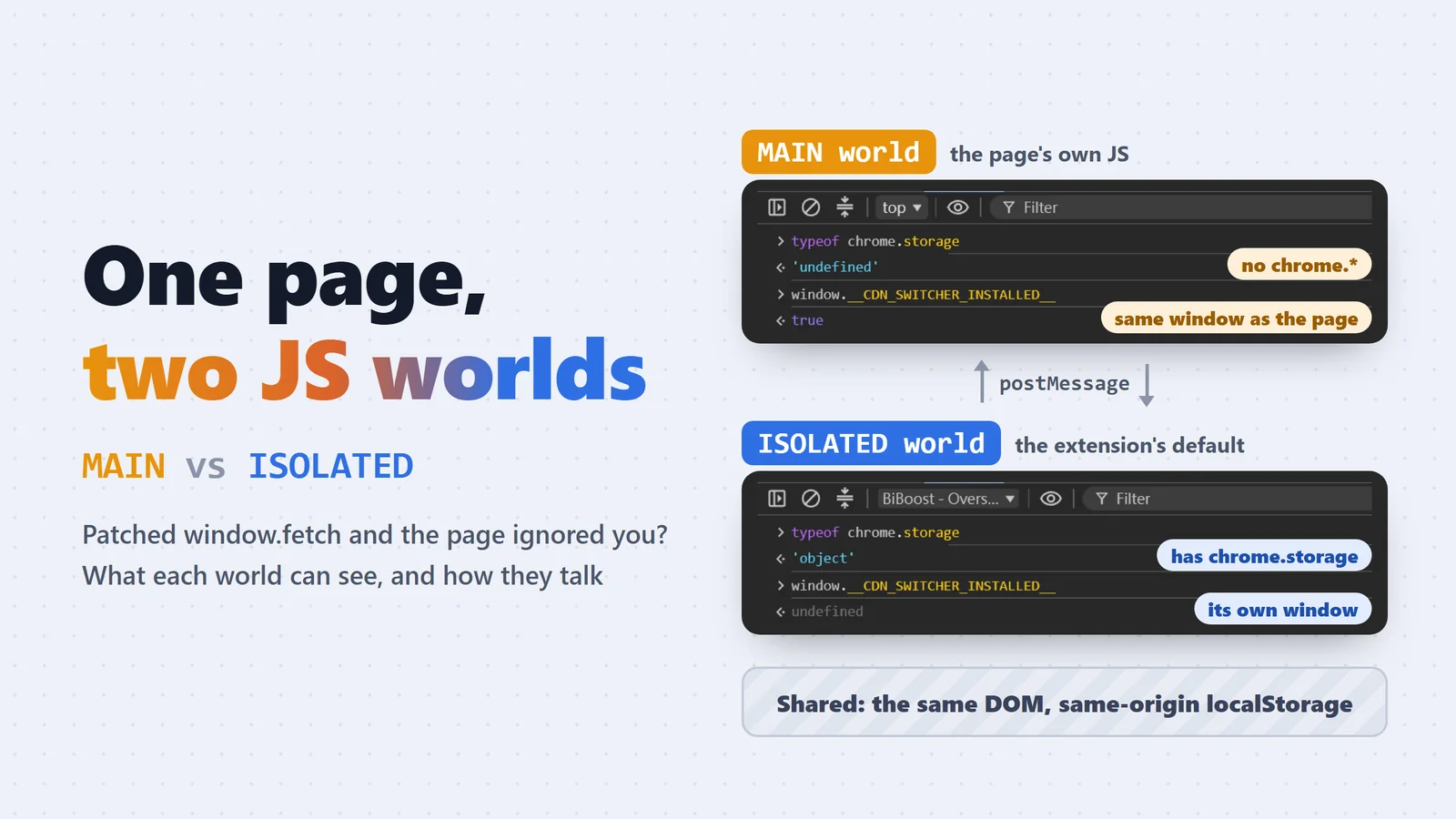
一般的 content script 跑在 ISOLATED world:看得到同一份 DOM,但 window 是另一份。你在那邊把 fetch 換掉,頁面根本不會用到。所以 hook 一定要注入頁面的 MAIN world,而且要在 document_start 就跑,理論上比 B 站任何一行 script 都早(實際上不一定,最後一節會講怎麼驗)。兩個 world 的差別另外寫了一篇:Chrome 擴充的 MAIN world 和 ISOLATED world。
"content_scripts": [
  { "matches": ["*://*.bilibili.com/*"], "js": ["main-hook.js"],
    "run_at": "document_start", "world": "MAIN", "all_frames": true },
  { "matches": ["*://*.bilibili.com/*"], "js": ["bridge.js"],
    "run_at": "document_start", "world": "ISOLATED", "all_frames": true }
]
代價是 MAIN world 沒有 chrome.* API,讀不到使用者的設定。
那叫 ISOLATED world 的 bridge.js 讀完 chrome.storage 再傳過來? 來不及。chrome.storage 是非同步的,等它 callback 回來,B 站的 script 早就跑完了。
所以 bridge.js 平常就把設定同步一份到同源的 localStorage(設定一有變動就重寫),main-hook.js 在檔案開頭直接同步讀。它讀到的是 bridge 之前寫好的那份,不是這次載入才去拿的:
var cfg = readCfg(); // window.localStorage.getItem("__CDN_SWITCHER_CFG__")
function isActive(c) { return !!c.enabled && c.videoEnabled !== false && c.cdnHost !== "base"; } // "base" 是舊版的「原始(不覆寫)」選項,等同關閉
var ACTIVE = isActive(cfg); // 依「載入當下」設定決定是否安裝 hook
載入之後,bridge.js 每次發現設定變了,會再用 postMessage 把新設定推給 main-hook.js,main-hook.js 收到就更新 cfg。ACTIVE 是載入當下定死的,所以開關功能要整頁重載;換節點不用(後面會講為什麼,也會講哪些情況還是得重載)。
B 站的播放網址從哪幾條路進來
我把 B 站播放器的行為拆開看,網址會從四條路進來:
- 第一個分 P:網址直接寫在 HTML 裡(伺服器端渲染,SSR),由一段 inline script 塞進
window.__playinfo__。 - 換分 P、番劇、課程:播放器去打 playurl API。一般影片是
x/player/wbi/playurl,番劇是pgc/player/web/v2/playurl,課程是pugv/player/web/playurl。可能走fetch也可能走 XHR,兩個都要包。 - 分段請求本身:播放器拿到網址後,一段一段去 CDN 抓
.m4s。這是最後一關,網址長什麼樣,影片就從哪裡來。 - 直播:另一套 API、另一套網址規則,最後講。
每條路上都埋一個 hook:
改了什麼:只換 host,順序重排
不管網址從哪條路來,B 站給的 JSON 結構都差不多:dash.video、dash.audio 底下每一軌有一個 baseUrl 和一串 backupUrl(舊格式叫 durl,番劇、課程還多包一層 video_info)。
下面是一支一般影片的 window.__playinfo__,從 B 站頁面實際抓下來的。只留一軌影片、一軌音訊;網址的 query 很長,又帶著帳號和 IP 相關的參數,只留幾個看得出用途的:
{
  "code": 0,
  "data": {
    "quality": 32,
    "format": "flv480",
    "timelength": 2055637,
    "accept_quality": [32, 16],
    "dash": {
      "duration": 2056,
      "video": [
        {
          "id": 32,
          "baseUrl": "https://upos-hz-mirrorakam.akamaized.net/upgcxcode/31/21/62131/62131_da3-1-30032.m4s?e=...&deadline=1792937073&upsig=...&hdnts=...",
          "base_url": "(同 baseUrl)",
          "backupUrl": [
            "https://upos-sz-mirrorcosov.bilivideo.com/upgcxcode/31/21/62131/62131_da3-1-30032.m4s?e=...&deadline=1792937073&upsig=..."
          ],
          "backup_url": ["(同 backupUrl)"],
          "bandwidth": 155817,
          "mimeType": "video/mp4",
          "codecs": "avc1.64001E",
          "width": 512,
          "height": 384,
          "frameRate": "14.925",
          "SegmentBase": { "Initialization": "0-1002", "indexRange": "1003-5954" },
          "codecid": 7
        }
      ],
      "audio": [
        {
          "id": 30216,
          "baseUrl": "https://upos-hz-mirrorakam.akamaized.net/upgcxcode/31/21/62131/62131_da3-1-30216.m4s?e=...",
          "backupUrl": [
            "https://upos-sz-mirrorcosov.bilivideo.com/upgcxcode/31/21/62131/62131_da3-1-30216.m4s?e=..."
          ],
          "bandwidth": 68646,
          "mimeType": "audio/mp4",
          "codecs": "mp4a.40.2"
        }
      ],
      "dolby": { "type": 0, "audio": null },
      "flac": null
    }
  }
}
幾個跟擴充有關的地方:
- 這支影片原本的
baseUrl在 akamai(upos-hz-mirrorakam.akamaized.net),backupUrl是 B 站自家的upos-sz-mirrorcosov。擴充要改的就是這兩個欄位。 - 同一個欄位給兩份:
baseUrl/base_url、backupUrl/backup_url,值一模一樣(音訊軌也一樣,上面省略了)。所以applyTrack寫回時,原本有哪個欄位就改哪個。 video是這支影片的所有畫質、所有編碼,每一軌都要改。id是畫質代碼(32 是 480P、16 是 360P),同一個畫質還分 AVC、HEVC、AV1 各一軌,這支影片一共 6 軌影片、2 軌音訊。dolby、flac(杜比和 Hi-Res 音訊)有內容的話,裡面也是同樣的軌道結構,一起改。
番劇、課程和舊格式外層長得不一樣,軌道本身是同一套(下面只是結構示意):
// 番劇(pgc/player/web/v2/playurl)、課程:dash 多包一層 video_info
{ "code": 0, "result": { "video_info": { "dash": { "video": [ ... ], "audio": [ ... ] } } } }

// 舊格式:沒有 dash,影音合在一起,網址在 durl 每一段的 url 和 backup_url
{ "code": 0, "data": { "durl": [ { "url": "https://...", "backup_url": ["https://..."] } ] } }
applyTrack 對每一軌做的事:
function applyTrack(track) {
  var base = asStr(track.baseUrl) || asStr(track.base_url) || asStr(track.url);
  var backups = track.backupUrl || track.backup_url || [];
  if (!Array.isArray(backups)) backups = [];
  backups = backups.map(asStr).filter(Boolean);
  // ...(選「備用」模式時反過來,備援排最前面)
  var swapped = base ? replaceHost(base, effHost()) : "";
  var ordered = distinct([swapped, base].concat(backups)).filter(Boolean);
  var top = ordered[0], rest = ordered.slice(1);
  track.baseUrl = top;   // 原本有 base_url/url 欄位的,也照原欄位寫回
  track.backupUrl = rest;
  return top;
}
擴充有兩種模式。平常是「節點模式」:effHost() 是你選的那個 host(例如 upos-sz-mirror08ct.bilivideo.com),程式裡用 isHostMode() 判斷。另一種是「備用模式」:不換 host,只把 B 站自己給的 backupUrl 排到最前面,也就是上面註解那行。下面講的都是節點模式。
baseUrl換成你選的節點,path 和 query 原封不動。網址裡的簽名不用重算,換了 host 一樣回 206、CORS 也過(這是實測出來的,B 站沒有保證過)。- 原本 B 站給的
akamaized.net跟備援節點,全部往後排進backupUrl,一個都沒丟。
replaceHost 就是 new URL(url) 之後改 .host,沒什麼魔法。
那 backupUrl 留著,你選的節點掛掉時播放器會不會自己往後試? 會試,但沒用。後面的 ③ 會把所有不是目標節點的分段請求換回目標節點,播放器退到 akamaized.net 的請求一樣被換回那個掛掉的節點。
留著的真正用途是另一件事:改寫時會順手記下這些 host,節點掛了,由擴充的自動切換把「目標節點」換成其中一個,③ 再把請求導過去(細節在另一篇)。
① __playinfo__:搶在 B 站寫入的那一刻
第一個分 P 的網址根本沒有發 API,HTML 一解析到那段 inline script 就寫進 window.__playinfo__,播放器再去讀。
要攔一個「被賦值」的動作? 那就在它被賦值之前,先把它變成 setter:
if (window.__playinfo__) rewriteRoot(window.__playinfo__, "playinfo"); // 晚到了,就地改
else {
  var store;
  Object.defineProperty(window, "__playinfo__", {
    configurable: true,
    get: function () { return store; },
    set: function (v) { try { rewriteRoot(v, "playinfo"); } catch (e) {} store = v; }
  });
}
B 站那行 window.__playinfo__ = {...} 照常執行,只是它觸發的是我們的 set。物件先改完才存起來,播放器之後讀到的就是改過的版本。
configurable: true 要留著,不然之後別人想對同一個名字 defineProperty 會直接丟錯。rewriteRoot 包在 try 裡,改壞了就放原物件過去,B 站照常播,頂多沒換到節點(hook 出事不能拖垮頁面,整支檔案幾乎每個 hook 都這樣包)。
如果 hook 晚到了(__playinfo__ 已經有值),就直接改那個物件。但播放器可能已經讀走了,所以這只是補救。
② playurl:包 fetch,回應只能讀一次
換分 P、看番劇的時候,網址是從 playurl API 回來的。包 window.fetch,看到 playurl 就等回應回來,改完 JSON 再交給播放器:
var _fetch = window.fetch;
window.fetch = function (input, init) {
  var url = typeof input === "string" ? input : (input && input.url) || "";
  // ...
  if (PLAYURL_RE.test(url)) {
    return _fetch.call(this, input, init).then(function (resp) {
      return resp.clone().text().then(function (txt) {
        var out = tryRewriteText(txt, "playurl");
        if (out == null) return resp;
        return new Response(out, { status: resp.status, statusText: resp.statusText, headers: new Headers(resp.headers) });
      }).catch(function () { return resp; });
    });
  }
  // ...
  return _fetch.call(this, input, init);
};
Response 的 body 只能讀一次。直接 resp.text() 讀完,播放器那邊就拿到一個已經被讀過的空殼。所以先 clone() 再讀,讀完:
- 有改到:用改過的文字
new Response(...)一個新的,status、statusText、headers 照抄(url、redirected這些唯讀欄位抄不過去,新的 Response 裡url是空字串)。 - 沒改到、或任何一步出錯:把原本那個
resp原封不動還回去。
tryRewriteText 會先用 indexOf 看看文字裡有沒有 dash、durl、backupUrl,沒有就不 JSON.parse,省得每個 playurl 回應都 parse 一次(XHR 那邊也共用這個函式)。
XHR:responseText 是唯讀的,怎麼改?
fetch 好歹可以換一個新的 Response 回去。XHR 沒這麼好命,responseText 跟 response 是 XMLHttpRequest.prototype 上只有 getter 的屬性,沒辦法直接賦值。
解法是在這一個 XHR 實例身上用 defineProperty 蓋一個同名的 own property。實例自己的屬性會擋在原型前面,播放器讀到的就是我們的 getter:
var textDesc = Object.getOwnPropertyDescriptor(proto, "responseText");
var respDesc = Object.getOwnPropertyDescriptor(proto, "response");
// proto.send 裡,確定是 playurl 時:
var compute = function () {
  if (computed) return; computed = true;
  if (self.responseType === "json") { var obj = respDesc.get.call(self); rewriteRoot(obj, "playurl"); cachedObj = obj; }
  else cachedText = tryRewriteText(textDesc.get.call(self), "playurl");
};
Object.defineProperty(self, "responseText", {
  configurable: true,
  get: function () { if (self.readyState === 4) { compute(); if (cachedText != null) return cachedText; } return textDesc.get.call(self); }
});
- 真正的回應還是用原型上原本的 getter
textDesc.get.call(self)去拿,不然會自己呼叫自己。 - 等
readyState === 4才改,而且只算一次。沒下載完就讀的,照原樣回傳。 responseType是"json"時,response已經是物件,直接改物件。response另外也蓋了一個同樣邏輯的 getter。
open 那邊也有一個很容易踩的坑:
return open.call(this, method, url, arguments.length > 2 ? arguments[2] : true, arguments[3], arguments[4]);
為什麼不直接傳 arguments[2]? 因為播放器如果只呼叫 open(method, url),arguments[2] 是 undefined。照規格,async 參數省略才是 true,明確傳 undefined 會被轉成 false,整個請求變成同步的。包一層 hook 就把頁面卡死,這種 bug 很難查。
③ 分段請求:最後一道關卡,也是換節點不重整的關鍵
前兩個 hook 改的是「網址清單」,第三個直接改「真的發出去的請求」。
function isSwappableSeg(url) {
  if (!isHostMode()) return false;
  if (!SEG_RE.test(url)) return false;
  var h = hostOf(url);
  return !!h && CDN_HOST_RE.test(h) && h !== effHost();
}
// fetch hook 裡:
if (isSwappableSeg(url)) {
  var nu = swapSegHost(url);
  if (typeof input === "string") input = nu;
  else { try { input = new Request(nu, input); } catch (e) {} }
}
XHR 一樣在 open 裡把 url 換掉。input 是 Request 物件的時候不能只換字串,要 new Request(nu, input),把 method、headers 這些一起帶過去。
既然 baseUrl 都改過了,為什麼還要這一層? 我在 av170001 上實測過:
player.reload()不會重打 playurl,只會重新初始化 MSE、重新請求分段。
意思是,使用者在 popup 換節點時,如果只靠改 playurl,就得整頁重新整理。有了分段這一層,流程變成:popup 存設定 → bridge.js 用 postMessage 把新設定推進來 → main-hook.js 更新 cfg.cdnHost(effHost() 每次都讀最新值)→ 呼叫 player.reload()。播放器重發的分段就會被導到新節點。不用整頁重載,全螢幕和進度都保留。
開關功能就不行了。設計上功能關掉時完全不碰 __playinfo__、不改任何網址,所以 setter 乾脆不裝,而不是裝了再看旗標。要裝或拆 setter,只能整頁重載。備用模式也一樣要重載,因為它只改 playurl 那層,得讓播放器重打一次 playurl。
實際的程式長這樣(精簡過,拿掉了 try/catch、日誌、換節點的提示和來源檢查):
// main-hook.js:收到 bridge.js 推來的新設定
window.addEventListener("message", function (ev) {
  if (ev.source !== window) return;
  var d = ev.data;
  if (!d || d.__cdnSwitcher !== 1 || d.dir !== "config") return;
  var beforeSig = effSig(cfg), beforeActive = ACTIVE, beforeEffHost = effHost();
  // 寫進 cfg 之後,effHost() 下一次就讀到新節點
  for (var k in DEFAULTS) if (d.payload[k] !== undefined) cfg[k] = d.payload[k];
  // 節點和開關都沒變(例如只切除錯疊層):什麼都不做
  if (beforeSig === effSig(cfg)) return;
  if (beforeActive !== isActive(cfg)) {
    // 開/關擴充:要裝或拆 hook
    fullReload();
  } else if (cfg.cdnHost === "backup" || beforeEffHost === "backup") {
    // 切到或離開「備用」:要重打 playurl
    fullReload();
  } else if (!WATCH_RE.test(location.pathname) || mainVideoIdle()) {
    // 不在觀看頁,或影片暫停、播完:不重載,之後的分段自然會走新節點
  } else if (!playerReload()) {
    // 拿不到 player.reload 才退回整頁重載
    fullReload();
  }
});

function playerReload() {
  var p = window.player;
  if (!p || typeof p.reload !== "function") return false;
  var t = p.getCurrentTime() || 0;
  // 重新初始化 MSE、重新請求分段,被分段 hook 導到新節點
  p.reload();
  if (t > 1) {
    // reload 不保證停在原本的進度:每 300ms 補一次 seek,直到差距小於 2 秒(最多約 20 次)
    var tries = 0, iv = setInterval(function () {
      if (Math.abs(p.getCurrentTime() - t) < 2 || ++tries > 20) return clearInterval(iv);
      p.seek(t);
    }, 300);
  }
  return true;
}
中間那個「暫停或播完就不重載」的分支是後來補的。節點設定存在 storage,所有分頁共用:在一個分頁測速、換了節點,其他分頁也會收到這次變更。暫停中的分頁如果也跟著 player.reload(),影片會自己播起來(回報 #33)。反正分段層每次都讀最新的 effHost(),這些分頁等使用者按播放,之後的分段一樣會走新節點,不用重載。
分段的判斷也踩過一次坑:
var SEG_RE = /\/upgcxcode\/.*\.m4s|\/upgcxcode\//i;
var CDN_HOST_RE = /(bilivideo\.(com|cn)|akamaized\.net|hdslb\.com)$/i;
function isSegUrl(url) { return SEG_RE.test(url) && CDN_HOST_RE.test(hostOf(url)); }
(SEG_RE 的前半段其實被後半段包含了,留著是歷史。)
原本只看路徑。結果 data.bilibili.com 的打點上報會把分段網址整串塞在 query 裡,被誤認成分段,速度樣本(擴充拿每個分段的下載速度算網速,就是除錯面板上的 spd)和「目前 CDN」全被污染。分段一定要連 host 一起驗。
分段請求失敗時(403、逾時、連不上)會自動退回備用節點,那是另一套邏輯,寫在另一篇。這邊只提一件事:播放器 seek 或切畫質時會自己 abort 進行中的分段,AbortError 不能當成節點壞掉。
④ 直播:同一個叢集裡換線路
直播完全是另一套規則。直播流的 host 長這樣,07 是叢集號,同一個叢集有四種線路:
- ov:
d1--ov-gotcha07.bilivideo.com - ovb:
d1--ov-gotcha07b.bilivideo.com - cn:
d1--cn-gotcha07.bilivideo.com - cnb:
d1--cn-gotcha07b.bilivideo.com
實測下來:
- 網址裡的 token 綁的是叢集號,同號的四種線路互通。
- 上一篇那 300 個點播節點拿來播直播,一律 403。
所以直播的「換節點」只能在同一個叢集號裡換線路,liveFetch 把 host 改成同號的另一種(開著自動切換時,失敗就地用原 host 重試)。
操蛋的是,每次換線路都要 livePlayer.reload(),播放器會重打 getRoomPlayInfo,B 站可能給你另一個叢集號。測速測的是 07,切過去播的卻是 05。
解法是 playInfoFetch:同一個直播間、同樣參數的 getRoomPlayInfo,簽名還沒快過期就直接回上次那份,連網路都不發。
if (txt && usablePlayInfo(parseOrNull(txt)) && (!reason || reason === "0") && playInfoServedAt.length < 6) {
  playInfoServedAt.push(now);
  return Promise.resolve(new Response(txt, { status: 200, headers: { "Content-Type": "application/json; charset=utf-8" } }));
}
- 進房的第一份不是 API 打的,是頁面 SSR 塞在
__NEPTUNE_IS_MY_WAIFU__.roomInitRes的(格式跟 API 回應一樣),拿它當第一份快取。 - 簽名剩不到 2 分鐘就放行,讓 B 站給新的。
- 播放器出錯自己重試(
req_reason不是 0),或 20 秒內已經回了 6 次快取(多半是播放器在死循環重試),一律放行,免得整批節點掛掉時被快取卡死。
自己測速時,要繞過自己的 hook
擴充有手動測速:拿目前在播的分段網址,把 host 換成每一個候選節點,各抓幾 MB 算速度。
問題來了。測速的請求如果走 window.fetch,會經過我們自己裝的 hook。isSwappableSeg 一看:「host 不是目前的目標節點?」,順手就把它換回目標節點。結果測了十個節點,其實十次都在測同一個。
所以在裝 hook 之前,先把原生的 fetch 存起來:
var NATIVE_FETCH = window.fetch; // 存原生 fetch,供手動測速用,繞開下面裝的 fetch hook

function measureHost(host) {
  var testUrl = replaceHost(sampleUrl(), host);
  // ...
  NATIVE_FETCH(testUrl, { signal: ctrl ? ctrl.signal : undefined, cache: "no-store" }).then(/* 讀 stream 計 bytes */);
}
這行在檔案第 163 行,installHooks() 在第 1032 行才呼叫,順序不能顛倒。直播的探測和測速也全部走 NATIVE_FETCH。
怎麼確認 hook 真的跑在 B 站前面
document_start 通常趕得上,但「通常」不是「一定」。所以 hook 裝完會自己檢查一次:
installHooks();
// hook 裝好前頁面已經打過 playurl → 那份 playurl 沒被改寫
debug.playurlBeforeHook = performance.getEntriesByType("resource").some(function (e) { return PLAYURL_RE.test(e.name || ""); });
hook 裝好之前就已經跑完的請求,會留在 Resource Timing 裡。查得到 playurl 就代表輸了這場競速,記進問題回報的日誌裡。還在飛、沒回來的請求不會出現在這裡,所以這只是粗檢,會漏報。
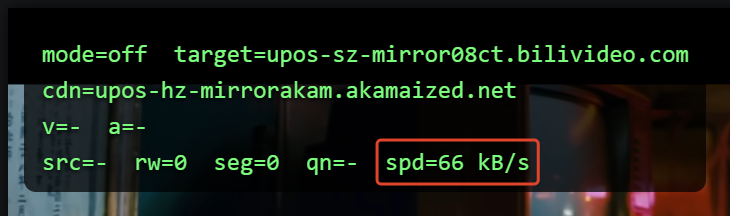
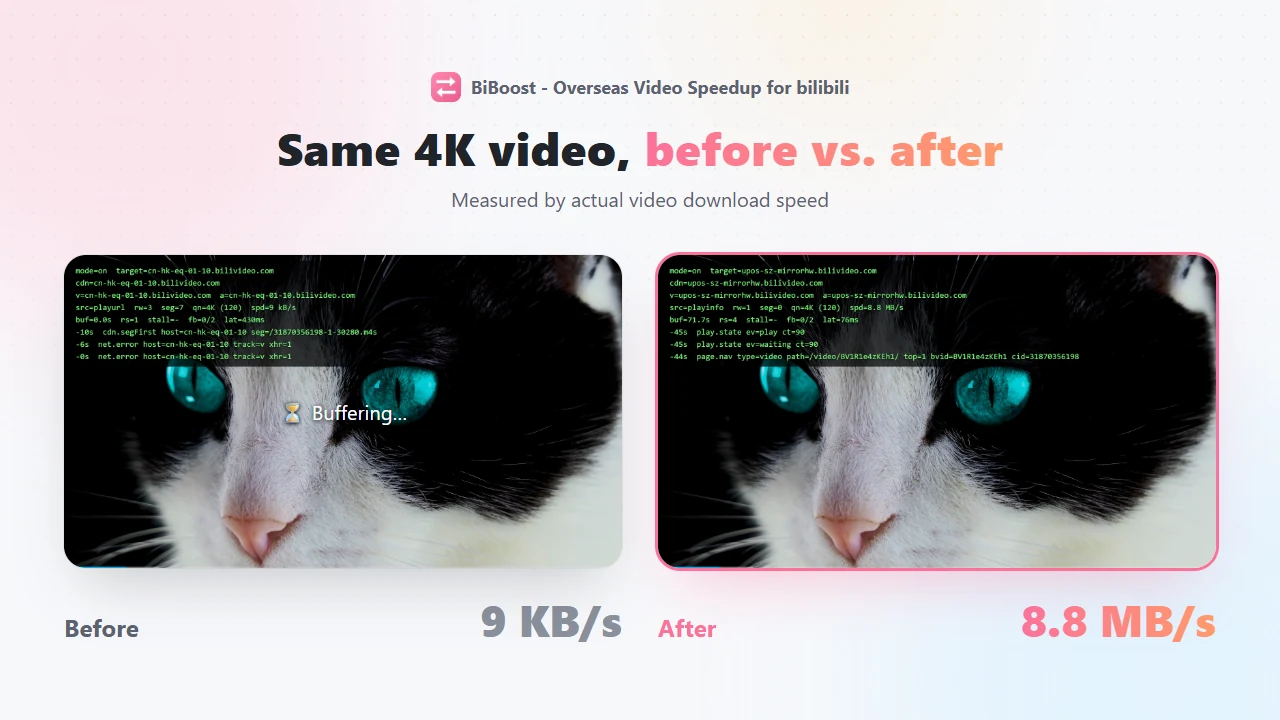
實際跑起來長這樣。這是擴充的除錯面板,關閉時(mode=off)B 站給的是 Akamai,rw=0 seg=0,什麼都沒改:
開啟後(另一支影片,數字看量級就好):
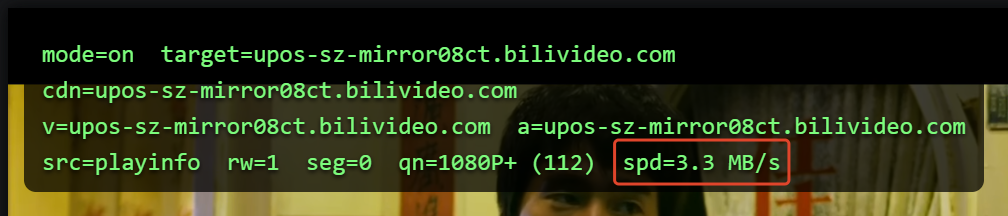
src=playinfo rw=1 表示這次是 ① 的 setter 改到的,改了一次。seg=0 是因為 ① 已經把 baseUrl 換成目標節點,分段那層一個都不用再換。① 和 ③ 是互補的:前面改到了,後面就閒著。
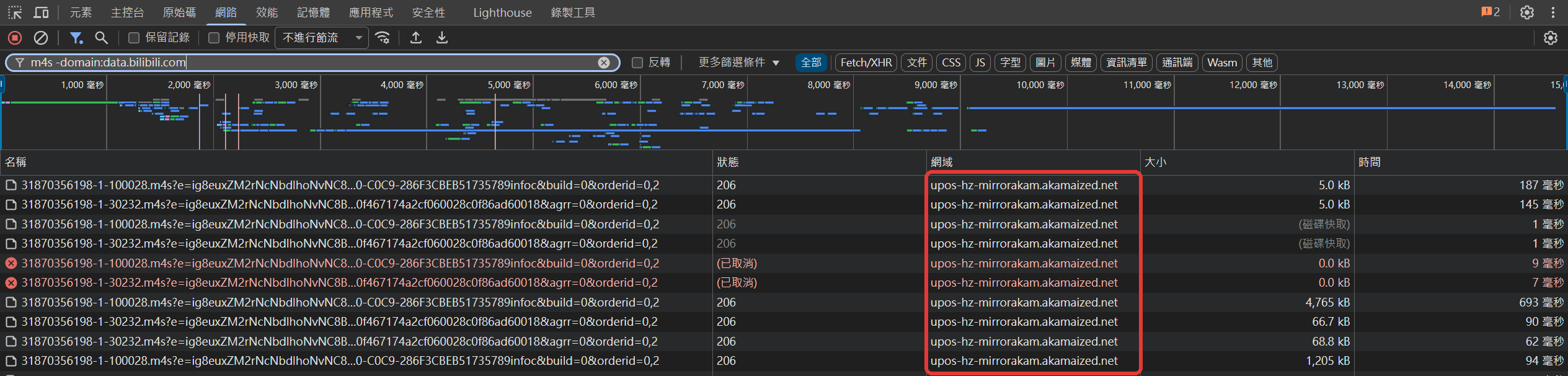
不想信除錯面板的話,直接看 DevTools 的 Network 面板。同一支影片,篩選 m4s(順便排除 data.bilibili.com,B 站的埋點網址裡也有 m4s 這幾個字)。
關閉擴充,分段全部從 Akamai 來:
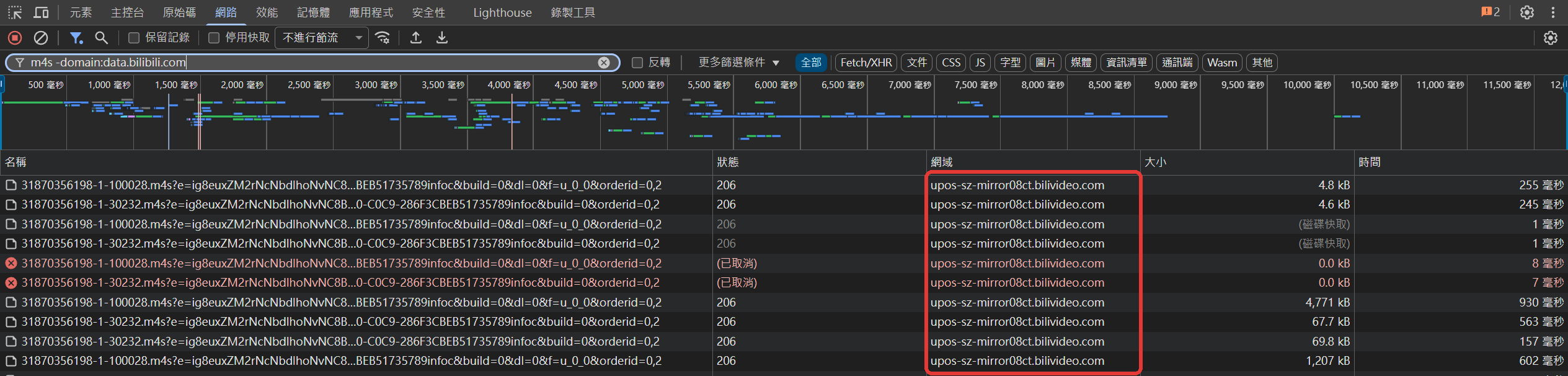
開啟擴充,同一支影片的分段全部改成 08ct:
原始碼
全部在 GitHub,src/main-hook.js 搜 installHooks 就是這篇的主體。想直接裝來用:嗶速 - 海外影片加速 for bilibili。
Comments(0)
No comments yet. Be the first to share your thoughts!