Bilibili hides video URLs in several places. To swap the CDN node, you have to get to every one of them before the player does.
My extension, BiBoost, does exactly one thing: once Bilibili hands out a video URL, it swaps the CDN node in it for the one you picked. Why you'd want that, and which node to pick, is the previous post.
This one is about how the swap actually happens.
All code is taken from src/main-hook.js in bilibili-cdn-switcher v2.6.0. The file is 1,777 lines, mostly speed tests, auto-fallback and a debug overlay. The part that does the swapping is installHooks and the handful of rewrite functions above it.
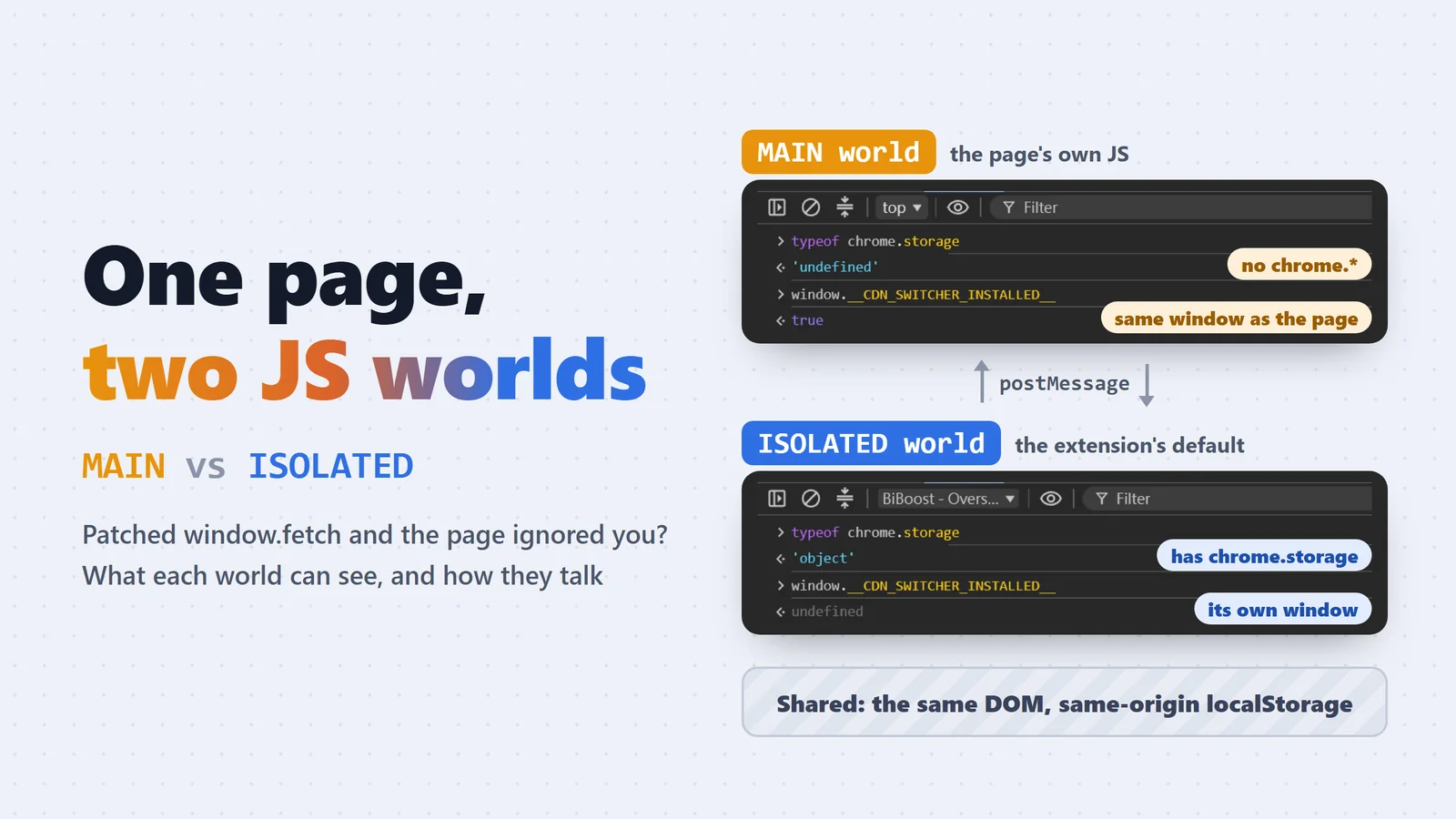
Why it has to live in the MAIN world
Bilibili's player gets its URLs and downloads video through the page's own window.fetch, XMLHttpRequest and window.__playinfo__.
A regular content script runs in the ISOLATED world. It sees the same DOM, but a different window. Replace fetch over there and the page never notices. So the hooks have to be injected into the page's MAIN world, at document_start, which in theory runs before any of Bilibili's scripts (in practice not always; the last section covers how to check). The two worlds get their own post: MAIN vs ISOLATED world in Chrome extensions.
"content_scripts": [
  { "matches": ["*://*.bilibili.com/*"], "js": ["main-hook.js"],
    "run_at": "document_start", "world": "MAIN", "all_frames": true },
  { "matches": ["*://*.bilibili.com/*"], "js": ["bridge.js"],
    "run_at": "document_start", "world": "ISOLATED", "all_frames": true }
]
The catch: the MAIN world has no chrome.* APIs, so it can't read the user's settings.
Why not have bridge.js in the ISOLATED world read chrome.storage and pass it over? Too slow. chrome.storage is async, and by the time its callback fires, Bilibili's scripts have already run.
So bridge.js keeps a copy of the settings in same-origin localStorage at all times (rewritten whenever they change), and main-hook.js reads it synchronously at the top of the file. What it reads is the copy bridge wrote earlier, not something fetched during this page load:
var cfg = readCfg(); // window.localStorage.getItem("__CDN_SWITCHER_CFG__")
function isActive(c) { return !!c.enabled && c.videoEnabled !== false && c.cdnHost !== "base"; } // "base" is the old "original (no rewrite)" option, i.e. off
var ACTIVE = isActive(cfg); // decided once, at load time
After load, whenever bridge.js sees the settings change, it pushes the new ones to main-hook.js with postMessage, and main-hook.js updates cfg. ACTIVE is frozen at load time, so turning the feature on or off needs a full page reload. Switching nodes doesn't (more on that later, including the cases that still need a reload).
The paths a stream URL takes
Taking the player apart, URLs come in through four paths:
- The first part of a video: the URL is baked into the HTML (server-side rendering), and an inline script assigns it to
window.__playinfo__. - Other parts, anime, courses: the player calls a playurl API. Regular videos use
x/player/wbi/playurl, anime usespgc/player/web/v2/playurl, courses usepugv/player/web/playurl. It might go throughfetchor XHR, so both get wrapped. - The segment requests themselves: with the URL in hand, the player downloads
.m4ssegments from the CDN one by one. Last stop. Whatever this URL says is where the video comes from. - Live streams: different API, different URL rules. Covered at the end.
One hook per path:
What gets changed: the host, plus a reorder
Whichever path a URL takes, the JSON looks about the same: each track under dash.video and dash.audio has one baseUrl and a list of backupUrls (the older format calls it durl, and anime and courses wrap it in an extra video_info).
Here's the window.__playinfo__ of a regular video, captured from a real Bilibili page. I kept one video track and one audio track. The URL query strings are long and carry account- and IP-related parameters, so only a few that show what they're for are left:
{
  "code": 0,
  "data": {
    "quality": 32,
    "format": "flv480",
    "timelength": 2055637,
    "accept_quality": [32, 16],
    "dash": {
      "duration": 2056,
      "video": [
        {
          "id": 32,
          "baseUrl": "https://upos-hz-mirrorakam.akamaized.net/upgcxcode/31/21/62131/62131_da3-1-30032.m4s?e=...&deadline=1792937073&upsig=...&hdnts=...",
          "base_url": "(same as baseUrl)",
          "backupUrl": [
            "https://upos-sz-mirrorcosov.bilivideo.com/upgcxcode/31/21/62131/62131_da3-1-30032.m4s?e=...&deadline=1792937073&upsig=..."
          ],
          "backup_url": ["(same as backupUrl)"],
          "bandwidth": 155817,
          "mimeType": "video/mp4",
          "codecs": "avc1.64001E",
          "width": 512,
          "height": 384,
          "frameRate": "14.925",
          "SegmentBase": { "Initialization": "0-1002", "indexRange": "1003-5954" },
          "codecid": 7
        }
      ],
      "audio": [
        {
          "id": 30216,
          "baseUrl": "https://upos-hz-mirrorakam.akamaized.net/upgcxcode/31/21/62131/62131_da3-1-30216.m4s?e=...",
          "backupUrl": [
            "https://upos-sz-mirrorcosov.bilivideo.com/upgcxcode/31/21/62131/62131_da3-1-30216.m4s?e=..."
          ],
          "bandwidth": 68646,
          "mimeType": "audio/mp4",
          "codecs": "mp4a.40.2"
        }
      ],
      "dolby": { "type": 0, "audio": null },
      "flac": null
    }
  }
}
What matters for the extension:
- This video's original
baseUrlis on Akamai (upos-hz-mirrorakam.akamaized.net), and itsbackupUrlis Bilibili's ownupos-sz-mirrorcosov. Those two fields are what the extension rewrites. - Each field comes twice:
baseUrl/base_urlandbackupUrl/backup_url, with identical values (the audio tracks too; left out above). So whenapplyTrackwrites back, it updates whichever of the fields were there. videoholds every quality and every codec of the video, and every track gets rewritten.idis the quality code (32 is 480P, 16 is 360P), and each quality comes as separate AVC, HEVC and AV1 tracks: 6 video tracks and 2 audio tracks for this video.- When
dolbyandflac(Dolby and Hi-Res audio) have content, they use the same track structure and get rewritten too.
Anime, courses and the older format look different on the outside, but the tracks are the same (these are just sketches of the structure):
// Anime (pgc/player/web/v2/playurl) and courses: dash wrapped in an extra video_info
{ "code": 0, "result": { "video_info": { "dash": { "video": [ ... ], "audio": [ ... ] } } } }

// Older format: no dash, audio and video combined, URLs in each durl segment's url and backup_url
{ "code": 0, "data": { "durl": [ { "url": "https://...", "backup_url": ["https://..."] } ] } }
Here's what applyTrack does to each track:
function applyTrack(track) {
  var base = asStr(track.baseUrl) || asStr(track.base_url) || asStr(track.url);
  var backups = track.backupUrl || track.backup_url || [];
  if (!Array.isArray(backups)) backups = [];
  backups = backups.map(asStr).filter(Boolean);
  // ... (in "backup" mode it's reversed: backups go first)
  var swapped = base ? replaceHost(base, effHost()) : "";
  var ordered = distinct([swapped, base].concat(backups)).filter(Boolean);
  var top = ordered[0], rest = ordered.slice(1);
  track.baseUrl = top;   // tracks with base_url / url fields get written back to those
  track.backupUrl = rest;
  return top;
}
The extension has two modes. The usual one is "node mode": effHost() is the host you picked (say upos-sz-mirror08ct.bilivideo.com), and the code checks it with isHostMode(). The other is "backup mode": no host swap, just Bilibili's own backupUrls moved to the front, which is the // ... line in the snippet above. Everything below is about node mode.
baseUrlpoints to your node, with path and query untouched. The signature in the URL doesn't need recomputing: with the host swapped it still returns 206 and passes CORS (tested, not something Bilibili promises).- The original
akamaized.netURL and Bilibili's backups all move down intobackupUrl. Nothing gets thrown away.
replaceHost is just new URL(url) and setting .host. No magic.
So if your node dies, does the player fall back down the backupUrl list on its own? It tries, but it doesn't help. Hook 3 below swaps every segment request that isn't going to the target node back to the target node, so the player's retry against akamaized.net gets sent straight back to the dead node.
What the list is really for: the rewrite records those hosts along the way. When your node dies, the extension's auto-fallback changes the target to one of them, and hook 3 routes the requests there (details in the fallback post).
1. __playinfo__: beat Bilibili to the assignment
The first part never calls an API. The moment the HTML parser hits that inline script, the URL lands in window.__playinfo__, and the player reads it from there.
How do you intercept an assignment? Turn the property into a setter before anyone assigns to it:
if (window.__playinfo__) rewriteRoot(window.__playinfo__, "playinfo"); // too late, patch in place
else {
  var store;
  Object.defineProperty(window, "__playinfo__", {
    configurable: true,
    get: function () { return store; },
    set: function (v) { try { rewriteRoot(v, "playinfo"); } catch (e) {} store = v; }
  });
}
Bilibili's window.__playinfo__ = {...} runs as usual. It just ends up calling our set. The object is rewritten first, then stored, so whatever the player reads later is already patched.
configurable: true stays on, otherwise anyone who later calls defineProperty on the same name gets an exception. rewriteRoot is wrapped in try: if the rewrite breaks, the original object goes through and Bilibili plays as normal, just without the swap (a broken hook must never take the page down, and almost every hook in the file is wrapped this way).
If the hook arrives late (__playinfo__ already has a value), it patches that object directly. The player may have already read it, though, so this is damage control.
2. playurl: wrap fetch, and remember a body can only be read once
For other parts and anime, the URL comes back from the playurl API. Wrap window.fetch, wait for the playurl response, rewrite the JSON, then hand it to the player:
var _fetch = window.fetch;
window.fetch = function (input, init) {
  var url = typeof input === "string" ? input : (input && input.url) || "";
  // ...
  if (PLAYURL_RE.test(url)) {
    return _fetch.call(this, input, init).then(function (resp) {
      return resp.clone().text().then(function (txt) {
        var out = tryRewriteText(txt, "playurl");
        if (out == null) return resp;
        return new Response(out, { status: resp.status, statusText: resp.statusText, headers: new Headers(resp.headers) });
      }).catch(function () { return resp; });
    });
  }
  // ...
  return _fetch.call(this, input, init);
};
A Response body can only be consumed once. Call resp.text() directly and the player gets an empty, already-read shell. So it's clone() first, then read:
- Rewrite worked: build a fresh
new Response(...)from the patched text, copying status, statusText and headers (read-only fields likeurlandredirecteddon't carry over; the new Response has an emptyurl). - Nothing to rewrite, or anything threw: return the original
respuntouched.
tryRewriteText does a cheap indexOf for dash, durl or backupUrl before calling JSON.parse, so not every playurl response gets parsed (the XHR path shares this function).
XHR: responseText is read-only. Now what?
With fetch you can at least hand back a new Response. XHR isn't that friendly: responseText and response are getter-only properties on XMLHttpRequest.prototype. You can't assign to them.
The trick is to defineProperty an own property with the same name on that one XHR instance. Own properties shadow the prototype, so the player hits our getter instead:
var textDesc = Object.getOwnPropertyDescriptor(proto, "responseText");
var respDesc = Object.getOwnPropertyDescriptor(proto, "response");
// inside proto.send, once we know it's playurl:
var compute = function () {
  if (computed) return; computed = true;
  if (self.responseType === "json") { var obj = respDesc.get.call(self); rewriteRoot(obj, "playurl"); cachedObj = obj; }
  else cachedText = tryRewriteText(textDesc.get.call(self), "playurl");
};
Object.defineProperty(self, "responseText", {
  configurable: true,
  get: function () { if (self.readyState === 4) { compute(); if (cachedText != null) return cachedText; } return textDesc.get.call(self); }
});
- The real response still comes from the prototype's original getter,
textDesc.get.call(self). Otherwise the getter calls itself forever. - The rewrite only happens at
readyState === 4, and only once. Reads before the download finishes get the raw value. - With
responseTypeset to"json",responseis already an object, so the object gets patched directly.responsegets its own getter with the same logic.
open has a trap of its own:
return open.call(this, method, url, arguments.length > 2 ? arguments[2] : true, arguments[3], arguments[4]);
Why not just pass arguments[2]? Because if the player calls open(method, url), arguments[2] is undefined. Per spec, async defaults to true only when it's omitted. Explicitly passing undefined converts to false, and the request turns synchronous. Add one innocent-looking hook and the page freezes. Good luck finding that one.
3. Segment requests: the last checkpoint, and how nodes switch without a reload
The first two hooks rewrite the list of URLs. The third rewrites the request that actually goes out.
function isSwappableSeg(url) {
  if (!isHostMode()) return false;
  if (!SEG_RE.test(url)) return false;
  var h = hostOf(url);
  return !!h && CDN_HOST_RE.test(h) && h !== effHost();
}
// inside the fetch hook:
if (isSwappableSeg(url)) {
  var nu = swapSegHost(url);
  if (typeof input === "string") input = nu;
  else { try { input = new Request(nu, input); } catch (e) {} }
}
XHR does the same thing inside open. When input is a Request object, swapping the string isn't enough. new Request(nu, input) carries the method, headers and the rest over.
If baseUrl is already patched, why bother with this layer? Because of what I found testing on av170001:
player.reload()doesn't call playurl again. It only reinitializes MSE and re-requests the segments.
So when a user switches nodes in the popup, patching playurl alone would mean a full page reload. With the segment layer, the flow is: the popup saves the setting → bridge.js pushes it in via postMessage → main-hook.js updates cfg.cdnHost (effHost() always reads the latest value) → player.reload(). The segments the player re-requests get routed to the new node. No reload, and fullscreen and playback position survive.
Toggling the feature is a different story. By design, when it's off the extension doesn't touch __playinfo__ or rewrite any URL, so the setter simply isn't installed, rather than installed and checking a flag. Installing or removing it means a full reload. Backup mode needs a reload too, because it only works at the playurl layer and the player has to fetch playurl again.
Here's the actual code (trimmed: no try/catch, logging, switch toast or origin check):
// main-hook.js: new settings pushed in by bridge.js
window.addEventListener("message", function (ev) {
  if (ev.source !== window) return;
  var d = ev.data;
  if (!d || d.__cdnSwitcher !== 1 || d.dir !== "config") return;
  var beforeSig = effSig(cfg), beforeActive = ACTIVE, beforeEffHost = effHost();
  // once cfg is updated, effHost() returns the new node
  for (var k in DEFAULTS) if (d.payload[k] !== undefined) cfg[k] = d.payload[k];
  // node and on/off unchanged (say, only the debug overlay toggled): do nothing
  if (beforeSig === effSig(cfg)) return;
  if (beforeActive !== isActive(cfg)) {
    // extension turned on/off: hooks must be installed or removed
    fullReload();
  } else if (cfg.cdnHost === "backup" || beforeEffHost === "backup") {
    // switching to or from Backup URL mode: playurl must be fetched again
    fullReload();
  } else if (!WATCH_RE.test(location.pathname) || mainVideoIdle()) {
    // not a watch page, or paused/ended: skip it; later segments use the new node anyway
  } else if (!playerReload()) {
    // only fall back to a full reload if player.reload is missing
    fullReload();
  }
});

function playerReload() {
  var p = window.player;
  if (!p || typeof p.reload !== "function") return false;
  var t = p.getCurrentTime() || 0;
  // re-inits MSE and re-requests segments; the segment hook sends them to the new node
  p.reload();
  if (t > 1) {
    // reload may not keep the position: re-seek every 300 ms until within 2 s (max ~20 tries)
    var tries = 0, iv = setInterval(function () {
      if (Math.abs(p.getCurrentTime() - t) < 2 || ++tries > 20) return clearInterval(iv);
      p.seek(t);
    }, 300);
  }
  return true;
}
The "paused or ended: no reload" branch in the middle was added later. The node setting lives in storage and is shared by every tab: run a speed test and switch nodes in one tab, and every other tab receives that change too. If a paused tab also ran player.reload(), its video would start playing by itself (report #33). The segment layer reads the latest effHost() every time anyway, so once the user hits play in those tabs, later segments still go to the new node without a reload.
Detecting segments bit me once too:
var SEG_RE = /\/upgcxcode\/.*\.m4s|\/upgcxcode\//i;
var CDN_HOST_RE = /(bilivideo\.(com|cn)|akamaized\.net|hdslb\.com)$/i;
function isSegUrl(url) { return SEG_RE.test(url) && CDN_HOST_RE.test(hostOf(url)); }
(The first half of SEG_RE is already covered by the second half. It's left over from history.)
The first version only checked the path. Turns out the analytics beacons on data.bilibili.com stuff the whole segment URL into their query string. They got counted as segments and polluted the speed samples (the extension measures throughput from each segment download, the spd on the debug overlay) and the "current CDN" readout. Always check the host too.
When a segment request fails (403, timeout, connection refused), the extension falls back to a backup node. That's a separate piece of logic with its own post. One thing worth mentioning here: the player aborts in-flight segments on its own when you seek or change quality, so an AbortError must not count as a dead node.
4. Live streams: switching routes inside one cluster
Live is a different game. Live stream hosts look like this, where 07 is the cluster number and each cluster has four routes:
- ov:
d1--ov-gotcha07.bilivideo.com - ovb:
d1--ov-gotcha07b.bilivideo.com - cn:
d1--cn-gotcha07.bilivideo.com - cnb:
d1--cn-gotcha07b.bilivideo.com
From testing:
- The token in the URL is tied to the cluster number, and works across all four routes of the same cluster.
- The 300 VOD nodes from the previous post return 403 for every live stream.
So "switching nodes" for live means switching routes within one cluster. liveFetch rewrites the host to another route with the same number (and with auto-fallback on, retries on the original host if that fails).
The annoying part: every route switch needs livePlayer.reload(), which calls getRoomPlayInfo again, and Bilibili may hand back a different cluster. You speed-test cluster 07 and end up streaming from 05.
The fix is playInfoFetch: for the same room and the same parameters, as long as the signature isn't about to expire, it replays the last response without touching the network.
if (txt && usablePlayInfo(parseOrNull(txt)) && (!reason || reason === "0") && playInfoServedAt.length < 6) {
  playInfoServedAt.push(now);
  return Promise.resolve(new Response(txt, { status: 200, headers: { "Content-Type": "application/json; charset=utf-8" } }));
}
- The first response in a room doesn't come from the API. The page's SSR puts it in
__NEPTUNE_IS_MY_WAIFU__.roomInitRes(same format as the API response), and that becomes the first cache entry. - With less than 2 minutes left on the signature, the request goes through and Bilibili issues a new one.
- If the player is retrying after an error (
req_reasonisn't 0), or the cache has already been served 6 times in 20 seconds (most likely the player stuck in a retry loop), the request goes through too. Otherwise a cluster-wide outage would get stuck behind the cache.
Speed tests have to bypass our own hooks
The extension has a manual speed test: take the segment URL currently playing, swap the host to each candidate node, download a few MB from each and time it.
Here's the problem. If those test requests go through window.fetch, they hit our own hook. isSwappableSeg sees a host that isn't the current target and swaps it back. Ten nodes tested, all ten were actually the same node.
So the native fetch gets saved before any hook is installed:
var NATIVE_FETCH = window.fetch; // keep the native fetch for speed tests, bypassing the fetch hook below

function measureHost(host) {
  var testUrl = replaceHost(sampleUrl(), host);
  // ...
  NATIVE_FETCH(testUrl, { signal: ctrl ? ctrl.signal : undefined, cache: "no-store" }).then(/* read the stream, count bytes */);
}
That line sits at line 163. installHooks() isn't called until line 1032. The order matters. Live probes and live speed tests all go through NATIVE_FETCH as well.
Checking that the hooks actually beat Bilibili
document_start usually wins. "Usually" isn't "always", so after installing, the hook checks itself:
installHooks();
// the page already called playurl before the hooks were in → that playurl wasn't rewritten
debug.playurlBeforeHook = performance.getEntriesByType("resource").some(function (e) { return PLAYURL_RE.test(e.name || ""); });
Requests that already finished before the hooks went in stay listed in Resource Timing. If a playurl shows up, we lost the race, and it goes into the log attached to bug reports. A request still in flight won't be listed yet, so this is a rough check that can miss some.
Here's what it looks like in practice. This is the extension's debug overlay. With the extension off (mode=off), Bilibili hands out Akamai, and rw=0 seg=0, nothing touched:
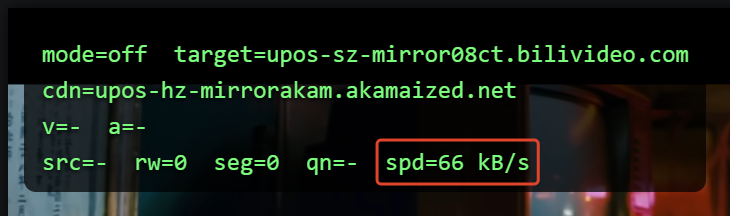
Turned on (a different video, so only compare the order of magnitude):
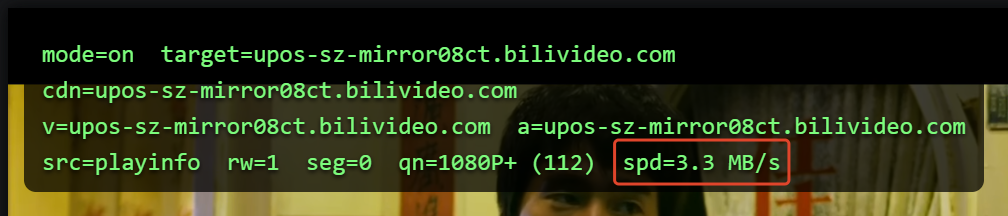
src=playinfo rw=1 means hook 1, the setter, did the rewrite, once. seg=0 because hook 1 had already pointed baseUrl at the target node, so the segment layer had nothing left to swap. Hooks 1 and 3 cover for each other: when the first one lands, the last one sits idle.
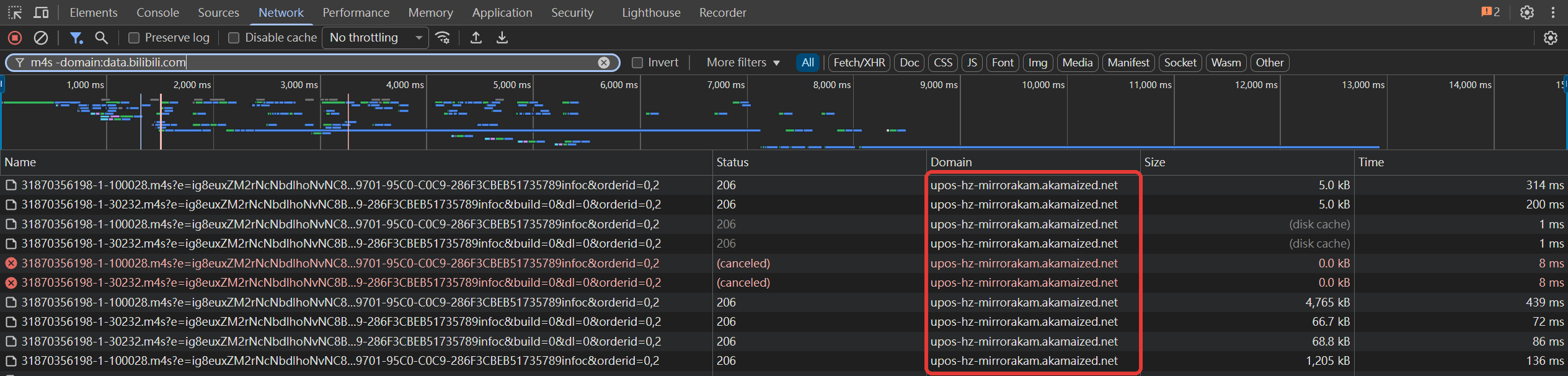
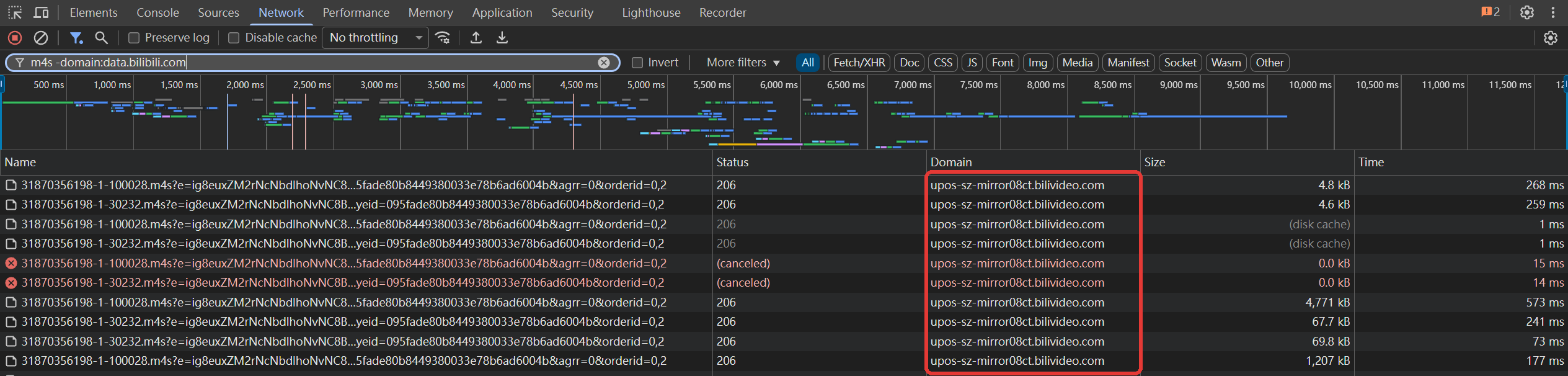
If you'd rather not trust my debug overlay, open the Network panel in DevTools. Same video, filtered to m4s (and excluding data.bilibili.com, because Bilibili's analytics URLs happen to contain "m4s" too).
Extension off, every segment comes from Akamai:
Extension on, the same video pulls every segment from 08ct:
Source
It's all on GitHub. Search src/main-hook.js for installHooks and you've found most of this post. To just install it: BiBoost - Speedup for bilibili.
Comments(0)
No comments yet. Be the first to share your thoughts!